Monday, 21 August 2017

4 Easy-to-Implement Tactics to Increase Your Newsletter Subscribers (FAST)

Can I go out on a limb here?

I’m going to guess you’re already sold on building an email list.

After all, you’ve heard the advice many times over:

“Build an email list. It’s where the money is.”

If you’re remotely interested in growing a business with staying power, it’s the wise thing to do.

It’s reported that for every dollar spent on email marketing, there’s an average $44 return on investment.

Here’s the thing though.

List building can be quite puzzling for both Internet marketing newbies and veterans.

Marketers agree. A whopping 63% say generating leads is their top challenge.

SOI blog top challenges4 1 png 1 000 500 pixels

The source of this confusion?

The massive amount of conflicting information out there.

There are about 198 MILLION posts on how to build an email list:

how to build an email list Google Search

That’s insane!

I’ll tell you one thing.

You don’t need to spend weeks creating a 45-page e-book as your opt-in offer. And you don’t need to read another “197 Ways to Grow Your Email List” post.

You can simply tweak your website to instantly boost your subscriber count.

Best of all, many of these tweaks will take less than an hour to implement.

That translates to more leads with less work.

Exciting, right?

In this article, I’ll give you four ridiculously easy to implement tactics. None of them require you to start from scratch.

Instead, you can make a few adjustments to your website for a more efficient list-building system.

Ready? Let’s start.

1. Funnel existing traffic to high-performing landing pages

Like I promised, we won’t be reinventing the wheel here.

Brian Dean calls this the Landing Page Funnel (LPF) Technique. It requires two things you should already have:

  1. traffic
  2. a landing page designed to convert leads.

Don’t worry, you don’t need tens of thousands of visitors a day or a landing page that converts at 50%.

Here’s how this works.

First, identify the landing pages that convert the best on your website.

Then, direct traffic you already receive to these pages.

Easy stuff, right?

Most people want more traffic. Some even take the necessary steps to get these much-coveted website visitors.

But they miss out on the golden opportunity to convert that attention into leads.

Once you have the two elements, it’s not difficult to do.

All you have to do is link extensively to these high-converting landing pages.

Place a link at the top of your website’s pyramid (in the main navigation menu):

Internet Marketing Strategy Social Triggers 1

You can also put a link in the comment section of posts as I do on Neilpatel.com:

How to Skyrocket Your Traffic by Bringing Your Old Content Back From the Dead

Or place links to landing pages for your top resources in your sidebar:

Starting and growing a blog Social Triggers

My point here is this: you may not need more traffic or opt-in offers to increase the number of your subscribers.

Track where your current web visitors spend the most time and ensure they have easy access to a high-converting landing page.

It’s as simple as adding a few links.

But what if none of your current landing pages convert well?

Improve them.

A basic email grab form is not enough.

You need to have all the persuasive elements on your landing page.

Here is how to improve your landing pages:

  • reduce the number of form fields. One form field is excellent, two is enough, and three is too many.
  • add social proof elements. Got an endorsement from a big name? Show it off. Have 15 000 subscribers? Let people know. Got one raving testimonial from a reader? Feature it.
  • have a strong value proposition. I’ll demonstrate with an example from SmartBlogger.

10 Creative Places for Opt In Forms That ll Supercharge Your Signups

They’ve had this same lead magnet for ages.

And I bet it converts like crazy.

It’s a valuable resource for writing headlines.

They don’t ask people to

download these headline formulas.

Instead, they lead with a compelling value proposition:

write viral blog posts quicker.

Makes sense?

2. Create content upgrades

I am a big fan of content upgrades.

You can uplevel your content by adding bonuses unique to each piece of content.

Let’s say you write an ultimate guide on promoting a blog post. You can create a quick cheat sheet for blog post promotion.

Like this:

17 Insanely Actionable List Building Strategies That Work Fast

You just have to extract the key points from your already-written blog post and create your bonus content.

I recommend keeping it short, snappy, and easily consumable.

Lead magnets, including content upgrades, should be something that subscribers can consume and implement quickly.

This way, there’s a sense of instant gratification, and your perceived value goes up.

It’s exactly what you want.

I’ll admit. This is the most time-consuming tactic on this list.

After all, you have to create a unique bonus for each post.

There are some clever ways around that, and I’ll share them with you.

1. Create multi-purpose content upgrades.

In other words, create a bonus that can be used for several blog posts.

This is easy to do if you’re blogging about the same topics.

2. Use the content you already have.

Let’s say you write a blog post entitled “27 Ways to Generate More Leads Using LinkedIn.”

You can feature 21 of these strategies in your blog post and provide the rest as a bonus.

Like this:

How To Get More Twitter Followers Fast Authority Hacker

3. Have a formula for creating your upgrades.

You don’t need to have every type of bonus under the sun to see results from this tactic.

Have a podcast? Stick with giving out transcripts.

Create only long-form and comprehensive content? Stick with PDF versions of your posts.

Decide what type of content upgrade you want to give to your readers, and go all in on it.

The process will become formulaic and efficient when you do it this way.

Whether you use these time-saving strategies or not, content upgrades are still worth the time you put into them.

Depending on what the actual upgrade is, it may take you an hour maximum.

Don’t neglect to prominently feature your content upgrades. Don’t bury them in the middle or at the bottom of your posts.

Instead, make readers aware of this bonus from the beginning.

What are some examples of content upgrades?

  • PDF version of a post
  • cheat sheet
  • checklist
  • additional strategies
  • list of resources or tools
  • printables and templates
  • transcript
  • video or audio recording
  • a challenge

The list goes on, but these give you enough food for thought.

If you’re serious about increasing your email list, here’s my challenge to you.

Step #1: Go through your website analytics, and pinpoint five blog posts with the most traffic.

Step #2: Create one content upgrade for each blog post. Spend less than an hour on each one.

Put these steps into action, and you’ll see a difference.

3. Create a vault of subscriber-exclusive content

It’s true.

Traditional opt-in offers don’t work anymore.

I’m talking about bulky reports and e-books.

Even if people sign up for these resources, they typically put off reading them.

The result? They never consume the information, yet alone implement it.

Think about the last time you downloaded an e-book. You tell yourself you’ll read it later and never get around to it.

I bet it happens all the time. I know it does for me.

Is there an easy solution?

Put all your free resources in one place so subscribers can have easy access to them.

Here’s an example from Blogging Wizard:

Blogging Wizard Discover Actionable Blogging Tips You Can Use

When you click the “exclusive content” link, it takes you to a high-converting landing page with 15+ resources.

15 Guides To Accelerate Your Blog s Growth By 425 Blogging Wizard 1

These resources are found on a password-protected page.

When you sign up, you get the password, and that’s it.

You’ve got a lifetime access to a vault of valuable resources.

Note:

Blogging Wizard married this strategy with the content upgrade.

Within blog posts, they feature their collection of subscriber-exclusive resources as a content upgrade.

How To Get More Twitter Followers 24 Effective Tips To Grow Your Following Fast

Now, that’s smart.

Here’s another example from Melyssa Griffin:

Melyssa Griffin Entrepreneur Blog Tips

Again, you don’t have to start from scratch.

I’ll give you the step-by-step play.

Step #1

Gather all the free resources you’ve created in the past. It could be ultimate guides, checklists, webinars, cheat sheets, etc.

Here’s a list of what Blogging Wizard has in its vault so you can get an idea:

15 Guides To Accelerate Your Blog s Growth By 425 Blogging Wizard

Step #2

Create a specific website page to host these resources. I recommend using the Essential Grid WordPress Plugin to display your content in a customizable grid.

Step #3

In WordPress, set the visibility of your page as “password protected,” choose your password, and publish your page.

Add New Page ContentHaven WordPress

Step #4

Create a landing page for your exclusive content, and funnel traffic to that page.

You’ll instantly have an opt-in offer that will keep converting leads.

You won’t have to create a new offer every few months when the one you have feeds you.

Be sure you keep adding fresh content to your vault, and you’ll be good to go.

4. Optimize these two most valuable website pages

There’s a good chance you’re not making the best use of crucial website real estate.

I’m talking about the two pages most people do nothing with.

The Home page and the About page.

Do a quick audit of your website.

If you don’t have more than one (minimum two) opt-in forms on both of these pages, you have a problem.

Fortunately, it’s an easy fix.

Let’s start with the Home page

Have you ever seen websites with home pages taken up almost entirely by opt-in forms?

Or at least, the first thing you see is a call to action to sign up for something.

Here’s what I mean:

Storyline Blog

Here’s another example from Neilpatel.com:

Neil Patel Helping You Succeed Through Online Marketing

Derek Halpern has about six calls to action on his homepage, inviting visitors to subscribe.

Five of them are presented in the first half of the page:

Internet Marketing Strategy Social Triggers

Too much?

Maybe, but it works.

Just ask his 300K subscribers.

Internet Marketing Strategy Social Triggers 2

The point is, you need to make optimal use of your homepage.

It’s often the most visited website page. You just have to do a few tweaks to add those opt-in forms.

Here are two quick fixes you can do right now:

Step #1

Add a HelloBar to your homepage to divert traffic to a landing page of your choice.

This is an opt-in tool that converts like crazy.

It’s as effective as a pop-up but less obtrusive and annoying.

About The Nectar Collective 1

Step #2

Add a link to an opt-in form or page in your main navigation menu.

Simple, right?

Let’s talk about your About page

There are few website pages as important as this one.

When new readers come to your blog, they’re guaranteed to visit this page.

They don’t know, like, or trust you yet.

That’s what your About page should be geared towards.

More importantly, it should convert these web visitors into subscribers.

How do you do that?

  1. Make your About page persuasive
  2. Add a few opt-in forms

I’ll tell you the key to making your About page subscriber-worthy.

Don’t make it about you.

Conflicting, I know.

Here’s a unique way to look at it.

Your About page should tell a story. Your audience should be the hero of that story. And you should position yourself as a trusted adviser to the hero.

Makes sense?

After you’ve amped up the quality of your About page, sprinkle in a few opt-in forms.

About Social Triggers

Beautiful designs like the one above work, but you can keep it simple with an inline opt-in form.

About The Nectar Collective

Conclusion

Profitable businesses are built on the relationships they nurture with their audiences.

Right now, the best (and only) way to do that effectively is through email marketing.

At the center of that is getting people to trust you enough to give you their email addresses.

And you know what?

It’s way less complicated than people make it out to be.

You really don’t need to spend hours creating bulky opt-in offers.

Double down on a few strategies that have been proven to work. In this article, I gave you four you can start using immediately.

They’re super actionable and easy to implement.

Put them to work, and I guarantee your subscriber count will increase.

What are your best strategies for gaining new subscribers fast?


from http://feedproxy.google.com/~r/Quicksprout/~3/3gNTjGAfj0A/

source https://kateninablog.tumblr.com/post/164472075079

5 ways to identify potential featured snippets to rank for

Have you been wondering how to start owning Google’s featured snippets for your brand?

If you’d like to earn those coveted “position 0” spots, you need to start by understanding what featured snippets are and how to earn them. By earning featured snippets, you can increase web traffic, boost visibility in Google SERPs, and earn the credibility you deserve.

The first, and most important, step in earning featured snippets is understanding how to identify “snippable” opportunities.  Once you know how to find them, you can craft the rest of your strategy around maximizing these opportunities.

In this article, I’ll go over five ways to identify featured snippet opportunities.

Use Google to identify potential snippets

Start looking for snippet opportunities by putting yourself in your audience’s shoes and thinking what questions you may want answers for.  Even boring industries have a large range of opportunities to answer questions in the featured snippets.

For instance, let’s say you are in the diamond industry. The very nature of this industry is filled with terminology people will search to get information about.

Doing a quick Google search like, “What is a girdle on a diamond” will showcase a Google featured snippet.

Hopefully the showcased content is yours. Under the snippet you will sometimes see a helpful note from Google, “People also ask.”

These are the pressing questions your target audience wants answers for. You can dig a little deeper and even see who has the leading content for that question based query.

Now that you see a few competitors, you can try to steal their snippet with a little more research and some snippable optimization.

Use SEMrush to snag competitor featured snippets

SEMrush is one of the most used online platforms for site analytics, and also a useful tool to identify Google Featured Snippets. You can use SEMrush to find your snippets, or use the platform to find your competitors’ snippets as well.

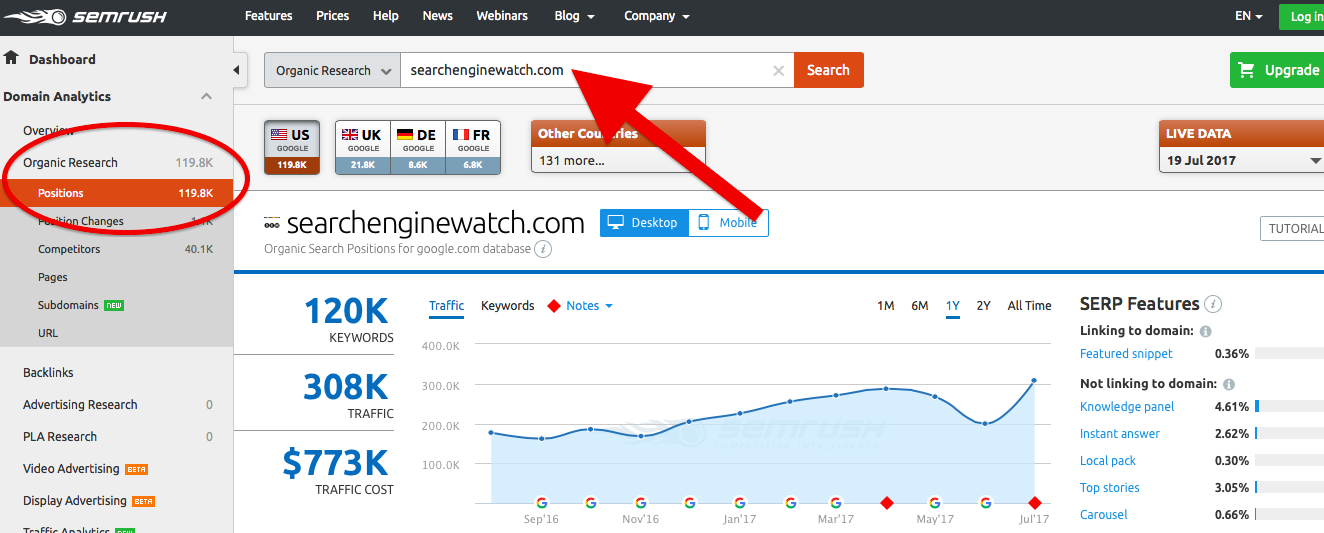
To check out your snippets, do an “Organic Research” search for your domain:

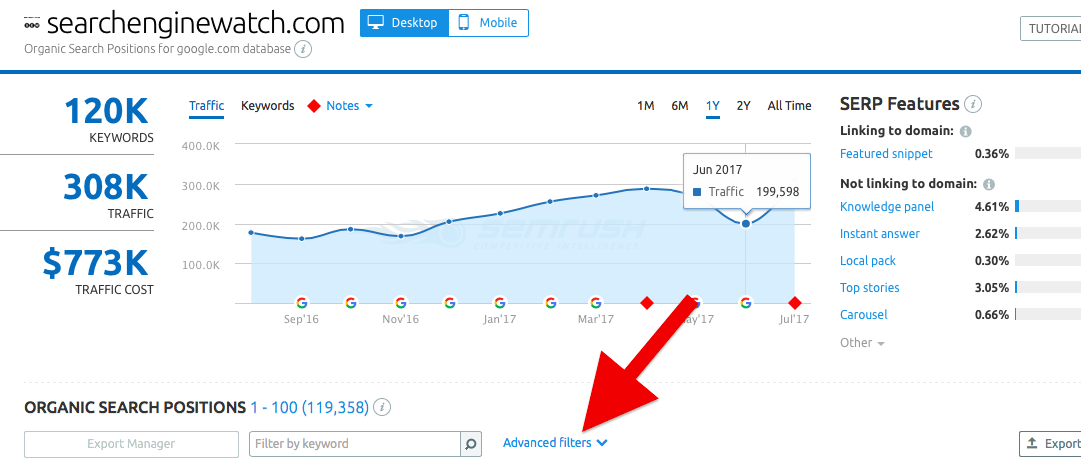
Next, locate “Featured Snippet” on the right side of the page.

You can also filter your snippable keywords using the “Advanced Filters” option, choosing Include – SERP Features – Featured Snippets.

Once you’d identified snippets that your competitors rank for, you can optimize for those same terms.

As for identifying your own snippets, it allows you to find variations of relevant long tail keywords that you could also own, and find keyword clusters that you already have authority in and might be able to expand upon.

Look for questions on Quora

Given that the foundation of these snippets is answering who, what, why, when, where type questions, you’ll need inspiration for finding the questions your audience is asking.

To do so, you can use Q&A platforms like Quora to find them. This will help you compile a healthy list of potential blog topics for your Featured Snippet content marketing campaign.

For instance, let’s say you were a travel site looking to compete with Kayak, Expedia, and other dominating brands.

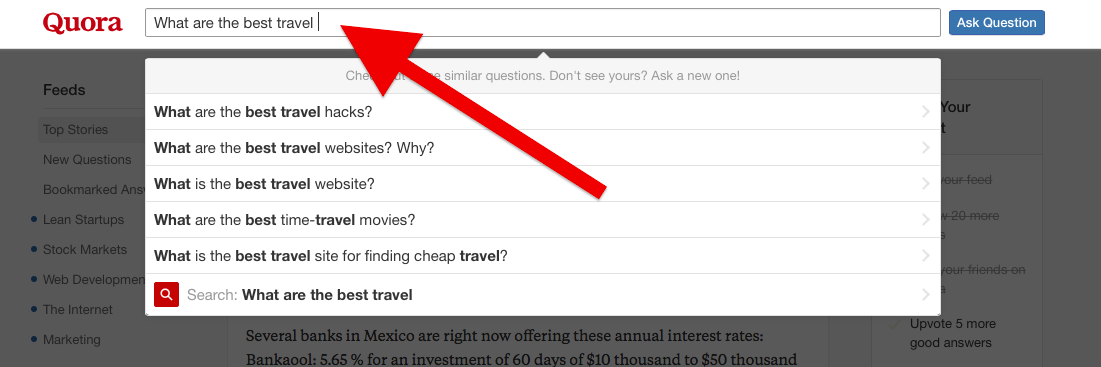
Type in a quick question with a few of your keywords:

A nice dropdown of questions to choose from will suddenly appear right from the get-go, even before finishing your question.

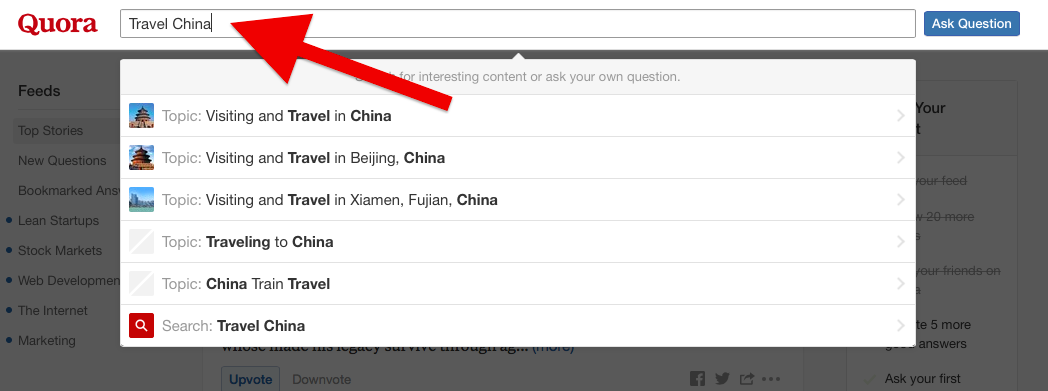
You can also type in one or two keywords and find groups that may have snippet-worthy questions waiting for you to develop content around.

Once in the group, you can poke around, follow certain questions. You can also find a nice list of other groups to the right you may want to check out.

Next, you can use the on-page elements to optimize for the snippets as described here.

Find segmented questions on Answer the Public

Did you know that certain question words have a higher likelihood of being showcased as a snippet? That’s right: the question in question matters.

According to research by SEMrush, question based queries that begin with “how” or “what” are more snippable than when, where, why, and who.

This is valuable knowledge to have, but where do you find questions segmented into those respectable question words fast? Well, Answer the Public to the rescue.

Let’s say you want to earn a few SEO content snippets.

Your search results for SEO will yield a ton of questions you can use for content. The best part is that you can focus on the “how” and “what” questions to increase your Featured Snippet chances.

Find a variety of questions on Reddit

If you are searching for a wide range of questions for your daily blog, Reddit can be very useful. This online platform offers valuable insight for what questions are trending.

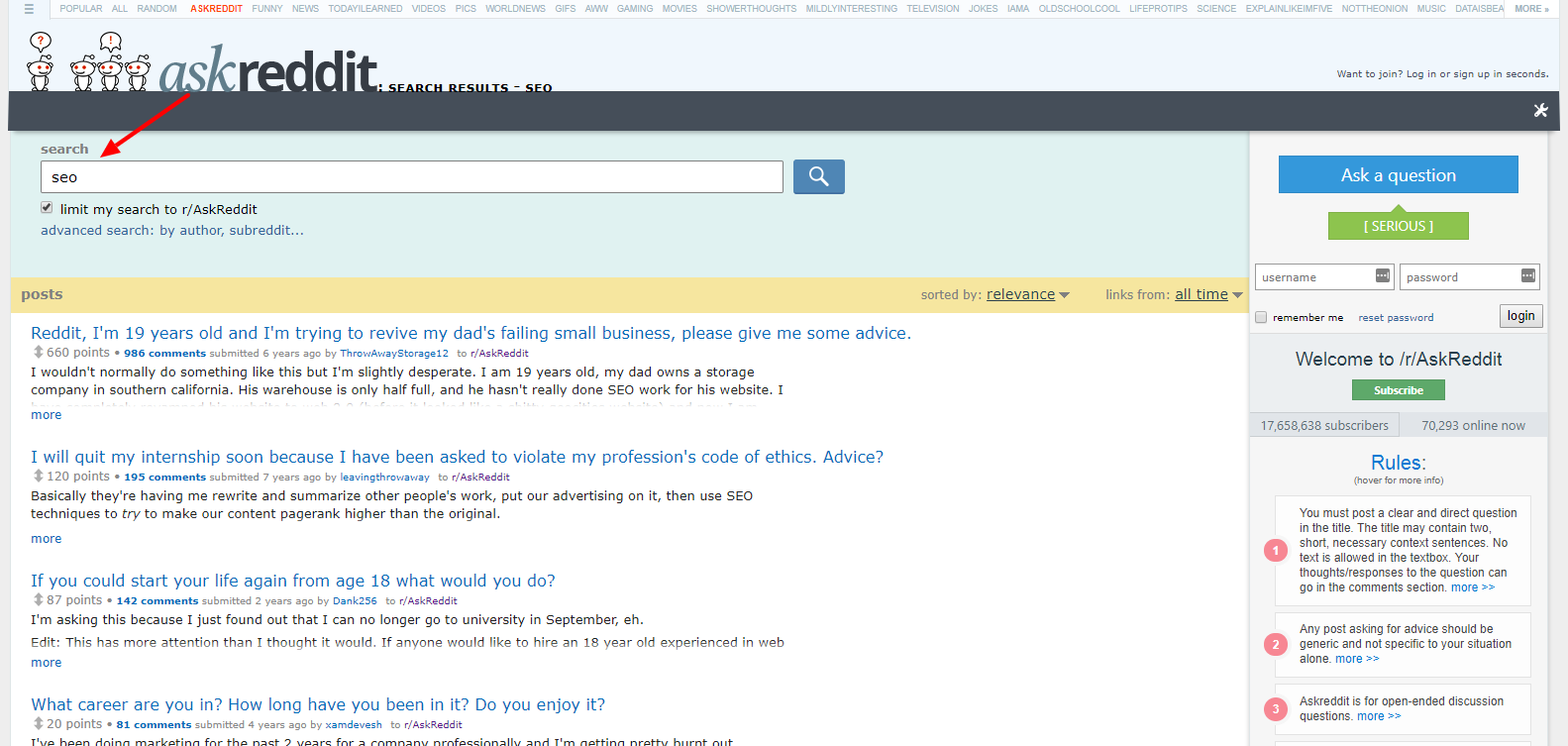
First, you will need to access the “askreddit” section of the platform:

Once you are there, you can use the search feature to further segment your search based on your industry. Focus on generic keywords in order to get relevant questions.

Once you’ve identified the questions, you can then focus on optimizing for those searches.

Ready for position zero?

Identifying potential Featured Snippet opportunities is the first step towards earning those coveted position ones. Make a list of all the question based queries you find using the above strategies, and begin optimizing your snippable content today.

How do you find featured snippet opportunities?


from https://searchenginewatch.com/2017/08/21/5-ways-to-identify-potential-featured-snippets-to-rank-for/

source https://kateninablog.tumblr.com/post/164446758004

Friday, 18 August 2017

How to escape Google’s filter bubble

For some people the personalization of their news apps and other content feeds online is a manual, conscious decision.

They want to be displayed certain topics due to their interests, which is completely understandable. Cut through the noise by making sure that you get given what you want.

For a lot of us, though, while personalization can make the considerable amount of time we spend scrolling through social feeds more entertaining, most of the automated personalization we encounter on a day-to-day basis is not necessarily requested – and is wider spread than one might initially think.

In a Ted talk, Eli Pariser discussed what he called the ‘filter bubble’. For those who have never heard of the filter bubble, it is a similar theory to that of ‘echo chambers’. Essentially, the focus of providing and consuming content that is closely aligned to your preferences results in the creation of a bubble or chamber, restricting your view of the wider picture.

Bubble floating against white background with the Google logo imposed on it.

As our internet ecosystem has evolved, we have shared increasing amounts of personal data with services we use every day, from social networks to search engines. They then use this data to tailor the content they provide us with to what they think will be most appealing, engaging or relevant. Google in particular has gradually increased the extent with which it tailors results to the user with innovations like Hummingbird and RankBrain, the inclusion of social results in search, and semantic search.

To many users this personalization of search results is helpful and convenient, but an increasing number of users are disturbed by the extent to which the sites they encounter are being shaped by forces outside of their control. If you are one of them, you may be wondering: How can you stop this from happening? How do you escape the filter bubble?

In this article, we are going to look at ways in which you can partially escape Google’s filter bubble, as well as how SEOs can penetrate it to make sure their sites are surfaced to as wide an audience as possible.

How do you escape Google’s filter bubble?

Disclaimer: If you want to be completely free of Google’s filter bubble, the only real way is to stop using Google. Know this, though – the rest of your treasured social feeds and news outlets will be no different, and who would want to stop using Google?

Do what you can to hide from the Big G

You can always log out of Gmail, delete your search history/browser cache and use an incognito browser (to prevent a level of browser caching). Again, though, you will not be completely free.

The filter bubble is not just specific to personal activity online; it also takes into personal factors that are not dictated by the individual such as device and location. You are also potentially not free of Google’s own internal bias, shown by their recent fine from the EU.

The outlook appears to be pretty bleak, huh? Well not entirely. Escaping Google’s filter bubble (and to an extent, all other platforms’ bubbles) is less about attempting to erase your internet history or privacy settings, and more about simply being aware of the bubble.

Awareness is critical

Take it upon yourself to find different sources and take an objective view. Let’s face it: echo chambers were around long before Google and Facebook. Newspapers have spent decades reporting the news with their own bias – you only need look at the differences in how The Independent and the Daily Mail provide commentary for the goings on in the world to see this in action.

Depending on how conspiracy theory-led you are, you could argue that this pushing of agendas comes straight from the top at a government level. The point is that the most powerful tool for escaping Google’s filter bubble is one’s own awareness of the situation. If you are researching important information, don’t take everything as gospel and verse. Research, utilize multiple sources, and try to look at the situation objectively.

All of us are culprits, including myself. We use a single news app because it is the easy option, thus our echo chambers are somewhat self-inflicted. That is not to say that we should necessarily start to use Ask Jeeves, Yahoo or DuckDuckGo.

The point is that we should look deeper than the first results, and utilize alternate sources to investigate key topics.

How can SEOs penetrate Google’s filter bubble?

Whichever side of the fence you are when it comes to the personalization of content and its effect on our ability to have complete access to information, the Google filter bubble presents a predicament to SEOs and marketers alike.

Compared with the deeper moral arguments surrounding the Google filter bubble, it may seem somewhat trivial to discuss how SEOs can flog more of their wares via Google. However, the filter bubble has a real impact on both consumers’ lives and companies.

So how as SEOs do we penetrate it?

How specific are target search terms?

We did a test in the office here with three different individuals off two different devices each (mobile with wifi turned off, and laptop), all logged in to their Gmail accounts. We tested both broad and more specific search terms, and were not displayed different results.

This is not to say that the filter bubble does not exist, but it did get us thinking. Pariser’s Ted talk used the example of two individuals searching for ‘Egypt’ and being returned very different results. The issue here? Egypt is an incredibly broad search term and whilst SEOs may look to target ‘broader’ search terms within their strategy, the majority will have a very different view of ‘broad’ when compared with searching for ‘Egypt’.

We would bet that the data would show a less powerful filter as the searches become more and more specific, especially for more traditional transactional search terms harbored by SEOs.

Penetrating the bubble

One of the main issues of the filter bubble for SEOs is that it takes users down a self-fulfilling path: the more you engage with a certain website or topic, the more likely you are to be shown similar information. As such, penetrating the filter bubble is the number one priority.

A constant improvement in your site’s authority will help prevent your website being shut out of people’s filter bubbles, but alternate marketing channels should also be utilized:

Social media

Capitalize on highly shareable content to expand your degrees of separation and drive traffic to your website. You will be competing against each social platform’s own version of the filter bubble, but this is somewhat mitigated by the ability to share content.

Paid search and social

If the bubbles are proving too strong to penetrate, incorporating paid search (Adwords) and social media advertising will give you a foot in the door for new prospective customers.

Email

Direct mail is often shunned by those of us that are dedicated to the Inbound Methodology but is another effective way of driving action from consumers. Use behavioural automation to take your campaigns to the next level and drive action.

Trust in the process

Let’s not throw the baby out with the bathwater here; what we are saying is nothing new. Trusting in the quality of your campaign and ensuring that you diversify the marketing channels that you employ should be part of the agenda regardless of filter bubbles. It might require a revisit of some of your core pillars but this is something that should be completed time to time anyway.

Really understand your buyer personas – these are the individuals who will become customers. Dig deeper into their drivers and satisfy their queries, questions and concerns. As always, value for the user is at the forefront of what we as SEOs should be providing.

Diversity of content and link building – again, no surprises here. Spread the net a little wider and assess how diverse the content is that you are providing. Is it too specific to a certain buyer persona and therefore somewhat neglecting other (also valuable) prospects?

Furthermore, high quality link building can gain you exposure on relevant sites, therefore widening the net further.

Keep people coming back

All of the above is great for your SEO campaign but don’t neglect the need to keep people coming back. The continual improvement of your user experience and a higher percentage of returning visitors will ensure that your users are furthering their own self-fulfilling Google filter bubble prophecy.

Combine this this with a widening diversity of content, and you put your website in a great place to mitigate the effects of the filter bubble.

If you enjoyed this article, check out some of our other pieces on similar topics:


from https://searchenginewatch.com/2017/08/18/how-to-escape-googles-filter-bubble/

source https://kateninablog.tumblr.com/post/164335119139

Thursday, 17 August 2017

The 15 best Google Chrome extensions for SEO

Google Chrome has taken a dominant position as the world’s favorite desktop browser, with almost 60% market share and rising.

Its central role among Google’s vast suite of digital software and hardware has driven this growth, but users also love how customizable the browser is.

It can be dauntingly customizable, in fact. With tens of thousands of extensions available, finding the few that will aid you on a daily basis is an all-consuming endeavor. In one store, you can find everything from Nicholas Page (an extension that turns any page Nicholas Cage-themed) to a variety of income tax calculators.

Somewhere in between those two extremes, there are hundreds of SEO-themed extensions, some much more useful than others.

There is a little bit of a learning curve to using some SEO Chrome extensions, but once they become habit, they will save plenty of time in the long run.

Therefore, within this list we have distilled this down to the 15 extensions that will simply make you more effective at the core areas of SEO.

Chrome extensions for a quick site review

SimilarWeb

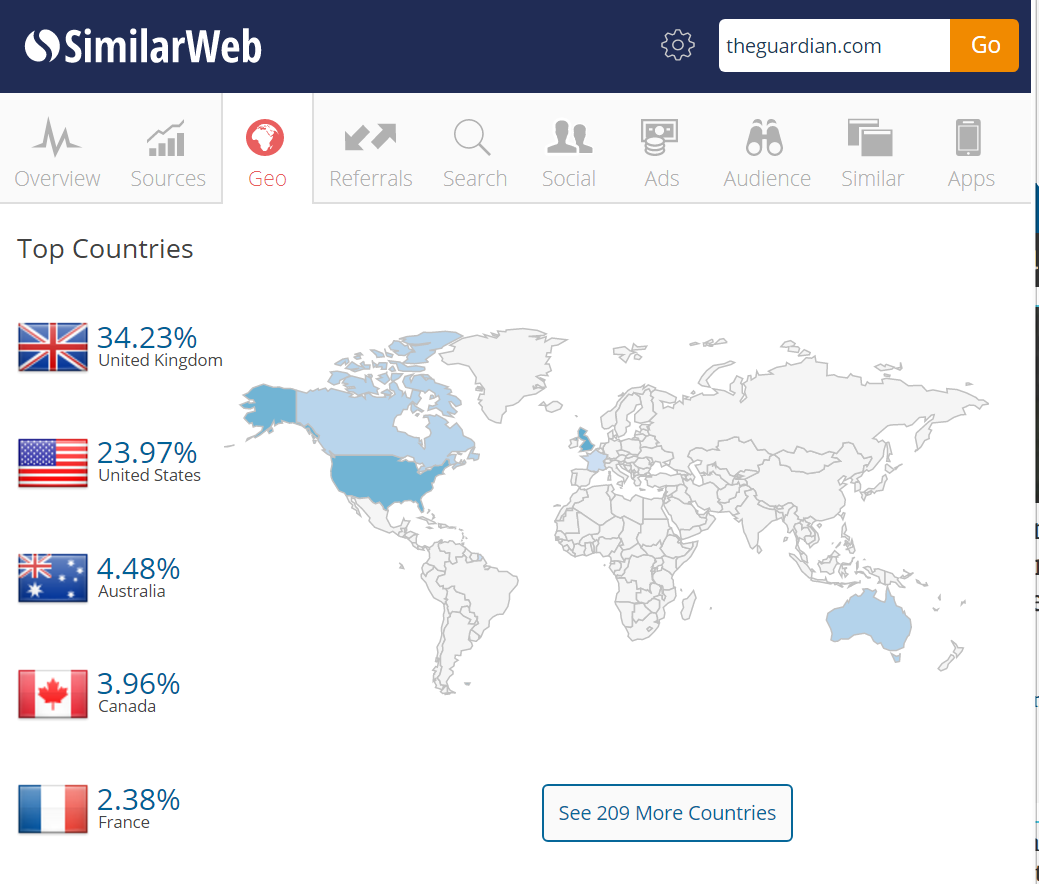
The SimilarWeb extension is a great place to start with a quick site analysis. It provides a broader view of a website beyond just SEO, taking into account all traffic sources. The extension does this by analyzing clickstream data from thousands of internet service providers, SimilarWeb’s own web crawlers, and their clients’ data.

As a result of these calculations, you can get reasonably reliable stats on a brand’s audience demographics, how much they spend on paid media, and which countries their traffic comes from.

All of these factors affect SEO, of course, so this provides invaluable insight when analyzing a brand’s digital presence. The Chrome extension is free, but a paid account does give access to a more complete data set.

MozBar

We couldn’t really have an SEO Chrome extensions list without including MozBar. As an all-in-one tool for a quick SEO site overview, MozBar is still the best on the market. Once a user is logged into their Moz community account (it’s free to sign up, for those that haven’t opened an account), MozBar springs into action on websites and search engine results pages.

It contains an extensive list of analyses, covering technical SEO, on-site content, social media engagement, and backlinks. MozBar can cause sites to load a little more slowly, however, so it’s best to enable it only when you need to assess a website’s SEO metrics.

Impactana

Impactana is a content marketing toolbar that offers the social media analysis you would expect, displaying share counts for each page on Twitter, Facebook, Linkedin, et al.

Where it stands apart from the competition is in its use of proprietary metrics to calculate the ‘Impact’ and ‘Buzz’ of each piece of content. These metrics incorporate user engagement signals to assess not just whether content has been shared, but whether people have interacted with it too. As such, it makes for a great starting point when analyzing the effectiveness of a competitor’s content marketing campaigns.

Chrome extensions for technical SEO

User agent switcher

In this mobile-first age, we need to make sure we are optimizing for a variety of screen sizes and device types. That’s pretty hard to do with just a desktop to hand, unless you have a user agent switcher downloaded.

This extension will give you the option to view web pages as they would appear on a wide variety of devices and operating systems. It’s an essential extension for developers, but it’s very useful for anyone conducting SEO analysis too.

Scraper

Quite often, we need to pull elements from a range of individual pages or websites for large-scale analysis. There are a few different ways of doing this, such as using IMPORTXML code to pull structured data from websites into Google Sheets or Excel.

The Scraper Chrome extension speeds up this process, using the XPath query language to export HTML data elements from a page, along with similar data from across the website.

It take a little getting used to, but there is a handy step-by-step guide here. Once you get accustomed to how Scraper functions, it saves a lot of time during any technical SEO audits.

META SEO Inspector

If we want to understand how a search engine crawls and indexes our websites (and presumably, we all do), we need to get to grips with metadata. META SEO Inspector goes beyond the narrow, SEO-focused definition of metadata as the ‘meta’ tags defined within the HTML source code.

The extension also facilitates analysis of XFN tags, canonical tags, and various microformats. It is also updated quite regularly to stay abreast of any amendments or additions to Google’s best practice guidelines.

Tag Assistant

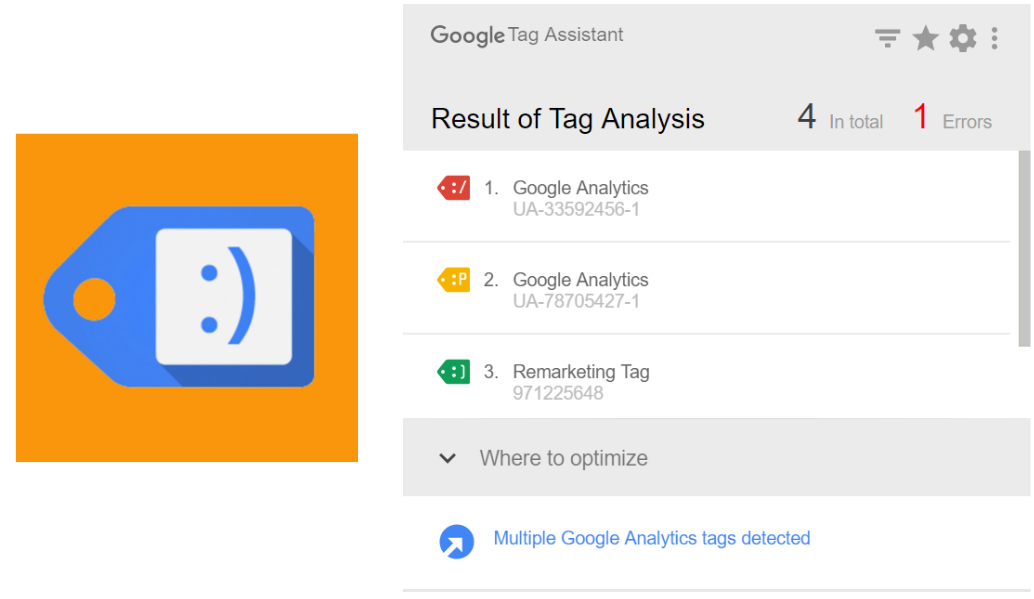
This Chrome extension from Google isn’t the most glamorous tool on our list, but it is one of the most useful. Tag Assistant acts as a trouble-shooter, verifying the installation of Google tags such as those used for Google Analytics and Remarketing.

The ability to record sessions and analyze the implementation of tracking tags through user journeys is perhaps Tag Assistant’s main USP. It gives the extension a lot of potential for frequent use, beyond the occasional spot checks to verify if tags are implemented correctly or not.

Page Load Time

As we discussed in a recent article, speed is of the utmost importance as Google continues to prepare its mobile-first index.

Page Load Time helps SEO keep an eye on this essential ranking factor, without being obtrusive in the way that other Chrome Extensions can be. Every time a page loads, it highlights the amount of time it took in seconds.

Users can then click on the extension’s icon to see a breakdown of the elements required to load the page’s content. For quick insights into page speed, it makes for the perfect starting point.

Chrome extensions for on-site content analysis

Page Analytics

Many of the entries on our list focus on assessing competitors, but this Google extension allows you to view data from your Google Analytics account while you browse your website(s). Once a user is logged into GA, they can view metrics from their account in real time by opening the extension.

The metrics available in this snapshot include bounce rate, unique page views, and average time on page. With the increasing prominence of user engagement factors in a RankBrain-driven Google search ecosystem, this extension is a very handy way to keep an eye on how each individual page is performing without visiting the Google Analytics platform.

Keywords Everywhere

Some things never change in SEO. We still need to understand which search queries our target audience uses, but gaining access to accurate search volumes has grown increasingly difficult. The Keywords Everywhere extension doesn’t quite solve this riddle entirely, but it goes some way towards providing a bit of clarity.

By pulling data from Google Keyword Planner, Google Search Console, and UberSuggest, the extension displays approximate search volumes within results pages. From there, SEO professionals can start to consider for which queries they want to optimize their content.

This extension shouldn’t be used in isolation to conduct larger keyword research tasks, but it has enough handy features to make it a worthwhile addition.

Spark Content Optimizer

This extension is ideal for getting different teams to incorporate SEO into their daily routines. Everyone from copywriters to developers can benefit from Spark, a Chrome add-on that scans content to assess how comprehensively it covers a topic and how well it makes use of popular search queries.

This can be a tricky area of SEO, as we want to provide a search engine with clear signals about our content, but also need to tread carefully to avoid stuffing in keywords to the detriment of content quality. Spark provides some hints without being overbearing, making it a worthy addition to any SEO armory.

Chrome extensions for backlink analysis

Link Research Tools

This toolbar from Link Research Tools overlays backlink data as users search and browse. It’s great for getting a quick look at a site’s backlink profile, although it does require a paid account to gain access to some of LRT’s more advanced features.

Much is the same fashion as MozBar, the LRT toolbar overlays backlink data onto search engine results pages too. This is very beneficial for taking a backlink-based look at why particular sites perform well for a keyword.

LinkMiner

LinkMiner is probably the best Chrome extension for identifying broken links. Once activated, it will highlight the number of outbound links on any page, highlighting in green those that are active, and in red those that are broken. It makes for an easy way to share issues with the development team and get links fixed.

Through its integration with a range of indices (including Ahrefs, Majestic, and Moz), it also creates a simple overview of the ratio of inbound to outbound links on each page.

Majestic Backlink Analyzer

Majestic remains one of the heavyweight SEO software packages, and this Chrome extension provides much of its functionality without having to visit a separate URL.

The Backlink Analyzer provides insight into the quantity and quality of backlinks pointing to any page, along with their topical relevance to the source material. Majestic’s index is larger than Moz’s, so this makes it a more robust reference point when conducting backlink analysis. You will require a paid Majestic subscription to avail of these benefits, however.

Buzzmarker

Engaging with influencers can be a fantastic way to gain relevant, authoritative backlinks. Nonetheless, as anyone who has worked in this field will know, the pursuit of those all-important backlinks can bring with it a lot of time-intensive, manual work.

This extension from outreach platform BuzzStream aims to simplify the outreach process. It helps with prospecting, by highlighting key social media metrics on a potential partner’s website. It also makes it easier to bookmark influencers and add them into the main BuzzStream platform.

Once more, this will require a paid BuzzStream account, but if you already have an account, then downloading this extension should be a no-brainer.


from https://searchenginewatch.com/2017/08/17/the-15-best-google-chrome-extensions-for-seo/

source https://kateninablog.tumblr.com/post/164297586629