Tuesday, 25 July 2017

Pump the brakes: SEO and its sweeping statements

The following article is an opinion post written by a guest author and may not necessarily reflect the views of Search Engine Watch.

Knee-jerk reactions are rarely based on sound judgement. Instead they are driven by emotion. In such scenarios, you would be better off giving due consideration prior to taking action.

The problem is that this advice is lost upon what would appear to be a worryingly large portion of the SEO world. At critical points, the SEO community has proven that they are prone to not only making knee-jerk reactions, but then vehemently defending these reactions long after the dust has settled.

It is somewhat excusable though. Search Engine Optimization is an imperfect science. Google is continually changing their fiendishly complex algorithms and will often neither confirm or deny such changes.

It’s a poker game where everyone wears masks and keeps their cards very close to their chest – and no-one shows their cards for free. Add to this the threat of your website being heavily sanctioned by one of Google’s many bizarrely-named updates due to ‘spammy’ techniques, and you can see why people are on edge.

To add to this, the amount of ‘how to’ SEO articles on the web is staggering, and can be intimidating even for those working in the industry every day. It can be a challenge to decipher which research to trust or whose advice to take. As a direct result, SEOs tend to hang on every last word released by Google.

Filter this down and the recognized names in the industry – the likes of Rand Fishkin, John Mueller, Danny Sullivan and Neil Patel, among others, hold considerable sway over how the industry acts.

So what’s the problem?

Well, it’s the knee-jerk nature of reactions to news or statements made by Google or the aforementioned industry experts. The community treats these like a call to arms, without considering the individualistic nature of any SEO campaign or the often countless other factors that should be taken into account.

Matt Cutt’s denouncement of spammy guest blogging in 2014 was one such example:

“Guest blogging is dead!”

In January 2014 Google’s very own leader of the crusades against spam, Matt Cutts, posted an article on his blog titled “The decay and fall of guest blogging for SEO”, a strongly-worded commentary on how the SEO community had used guest blogging as a manipulative SEO technique. They had ignored the distinction made by Cutts himself between high quality and low quality guest posting, a distinction that was central to the point he was making.

What followed was a deluge of articles warning readers not to engage in any sort of guest blogging. That guest blogging was “dead” and would fetch heavy penalties – irrespective of whether you were contributing heavily researched articles to major media outlets, that were then engaged with and shared on the web hundreds or thousands of times.

The reaction was so one-sided that Cutts had to add a final paragraph to his blog stating that he was not “throwing the baby out with the bath water” and that high-quality guest blogging was acceptable; marketers just needed to make sure it was of the right quality.

However, the myth of “dead” guest blogging has persisted, and you’ll still find people who fail to make the distinction.

“SEO is dead!”

Following the sudden release into the wild of Google’s pet Panda and Penguin earlier this decade, there was a surge in statements that “SEO is dead”. Many despaired, while others sought quick fixes – but there were some who realized that in fact, only the old spammy version of SEO was dead.

The quality, relevance and user driven SEO environment was actually more important than it ever was. Speaking to Josh Steimle on the subject, he had the following commentary:

“We get sweeping statements about the state of SEO because it’s human nature–we want quick fixes, easy solutions, and above all, we want safety and predictability. It’s easier to say that guest post blogging is dead, don’t do it, than it is to say that some guest post blogging is good, some is bad, and that you have to consider each situation on its own merits to determine what’s what.

“The good news, at least for SEO experts and companies who use SEO wisely, is that alarmist commentary helps separate the professionals from the amateurs, which gives an advantage to those who keep a cool head and do the work required to truly understand SEO.”

Don’t deviate from the path

The fact is that yes, technical SEO can be pretty darn complex and there are a lot of factors to consider. But isn’t that the same with any campaign, or indeed any business venture?

Many may complain that Google moves the goalposts but in actual fact, the fundamentals remain the same. Avoiding manipulative behavior, staying relevant, developing authority and thinking about your users are four simple factors that will go a long way to keeping you on the straight and narrow.

The Google updates are inevitable. Techniques will evolve, and results will require some hard graft. Every campaign is different, but if you stick to the core principles of white-hat SEO, you need not take notice of the sweeping statements that abound in our corner of the marketing world. Nor should you have to fear future Google updates.

The irony is not lost on me that I have made some rather wide-ranging statements of my own in this post. Nevertheless, I urge you to stop and take a breath before reacting to the next piece of revolutionary news that comes up in your Google alerts.

SEO will continue to be a critical marketing function for years to come, and abiding by its core pillars will prevent you from having to lose the metaphorical baby when dispensing of its bathing water.


from https://searchenginewatch.com/2017/07/25/pump-the-brakes-seo-and-its-sweeping-statements/

source https://kateninablog.tumblr.com/post/163433306449

Monday, 24 July 2017

5 essential aspects of technical SEO you cannot neglect

Eighty-eight percent of B2B marketers now report using content marketing in their promotional strategies, according to the Content Marketing Institute.

Developing content and using SEO to drive rankings and traffic has become a fundamental part of digital strategies, not just for the thought leaders of the industry, but it has become standard across the spectrum.

Thanks in large part to this massive development of online content, there are now more than one billion websites available online.

This tremendous growth has resulted in an increasingly competitive online market, where brands can no longer find success through guesswork and intuition. Instead, they must rely on more sophisticated strategies and means of enticing new customers.

The art of SEO lies in helping customers find your relevant, helpful content when it would benefit them and then creating a pleasant experience for them while they visit your website. Hence, it is vital that marketers do not neglect their technical SEO.

Sites still need to be built and structured well so they can be found, crawled, and indexed, hopefully to rank well for relevant keywords. There are a few technical SEO strategies in particular that we believe brands should be paying close attention to get their site in front of their competitors.

How does technical SEO impact the bottom line?

According to research performed at my company, BrightEdge, over 50 percent of the traffic on your site is organic. This means that the majority of the people visiting your page arrived there because they thought your listing on the SERP appeared the most relevant to their needs.

Those who neglect their technical SEO will find that this can damage the rankings their pages receive on the SERPs as well as the engagement on the actual site. In other words, not applying these core technical SEO concepts will negatively impact the number of visitors received, and thus revenue for the brand.

Customers have reported that how well the site runs greatly impacts their decision about whether or not to make a purchase. More than three quarters of customers – 79 percent – report that when they encounter problems with a site’s performance, they are less likely to buy from them again.

These customers also hold sites to a high standard, with a single second delay in page loading lowering customer satisfaction by 16 percent. Other common consumer complaints about websites include sites crashing, poor formatting, and error notifications.

Technical SEO makes it easier for users to find the website and then navigate it. It has a direct impact on rankings and traffic as well as the overall user experience. It should be clear, therefore, the tremendous impact that poor technical strategies and orphan pages can have on the bottom line for any organization.

5 essential aspects of technical SEO that cannot be neglected

1. Site accessibility

Site owners should periodically verify that the site is completely accessible for both search engine spiders as well as users. Robots.txt, for example, can be useful at times when you do not want a page to be indexed, but accidentally marking pages to block the spider will damage rankings and traffic.

Brands should also look closely at their Javascript coding to ensure that the vital information for the website is easily discoverable. Since customers also regularly complain about error messages and sites failing to load, brands should be checking for 404 pages and related errors.

Given that more searches now occur on mobile than desktop, and the impending switch to a mobile-first index on Google, brands should also ensure that any content published is constructed for mobile usage.

When speaking about the user experience, visitors themselves also pay a considerable amount of attention to load speeds. Brands should optimize for load speeds, watching site features such as cookies and images, that can slow down pages when not used correctly.

Things to do to improve your site’s accessibility:

  • Check that robots.txt is not blocking important pages from ranking
  • Make sure the robots.txt contains the sitemap URL
  • Verify that all important resources, including JS and CSS are crawlable
  • Find and fix any 404 errors
  • Check that all content, including videos, plays easily on mobile
  • Optimize for load speed

2. Site structure

Navigation throughout the website should also be a main priority. Look at the organization of the site’s pages and how easily customers can get from one part of the site to another. The number of clicks it takes to get to a desired location should be minimized.

Many sites find it to be convenient to build websites using a taxonomy hierarchy. Creating clear categories of pages can help websites organize their content while also reducing the number of steps that visitors must go through to adequately engage with the brand.

As you explore your site navigation, also verify how well the pages have been interlinked so that prospective customers engaging with one piece of content are easily led to other material that they will likely enjoy. Check also for orphan pages and other content that might be hard to find. The key to a strong site structure is to consider the user experience so that useful material can be found intuitively.

Things to do to ensure your site structure is optimized:

  • Create a hierarchy that ensures important pages are 3 clicks from the home page or less
  • Uncover orphan pages and either delete them or add them to the site hierarchy
  • Check links for broken or redirects and repair them

3. Schema markup

Schema markup provides search engines with even more information about the pages on your site, such as what is available for sale and for how much, rather than leaving it open for interpretation by the spiders and algorithm.

Although Google does tend to be relatively accurate about the purpose of websites, schema markup can help minimize the potential for any mistakes. In a increasingly competitive digital ecosystem, brands do not want to leave themselves open to errors.

Schema has also been attracting attention because of its potential to help brands trying to gain extra attention on the SERP in the form of Quick Answers and other universal content. Brands that want events included in the new Google Events SERP feature, for example, should use schema to call the search engine’s attention to the event and its details.

Things to do to make sure your site has the correct level of schema markup:

  • Markup pages that have been optimized for Quick Answers and other rich answers
  • Markup any events you list on your page or transcripts for videos
  • Check for common schema errors including spelling errors, missing slashes, and incorrect capitalization
  • Use Google’s Structured Data Testing Tool to ensure the markup has been completed correctly

4. Site tags

As sites become more technical, such as developing content in multiple languages for overseas versions of the site, brands will similarly need to pay closer attention to the markup and tags used on the pages. Correctly-used hreflang tags, for example, will ensure that the content is correctly matched with the right country.

Although Google might be able to tell that a website has been written in English, an hreflang tag can help ensure that it shows the UK version to the English audience and the US version to those in the United States. Displaying the wrong version of the websites to the audience can damage the brand’s reputation and ability to engage with the audience.

Many brands will also find canonical tags to be highly useful. Using these tags will signify to Google which version of any particular content is original, and which is the distributed or replicated version. If a marketer wants to publish syndicated content on another website, or even create a PDF format of a standard web page, canonical tags can help avoid duplicate content penalties so that weaken content visibility.

Things to do to ensure your site content is tagged correctly:

  • Use hreflang tags to ensure that Google knows which country and language the content is intended for
  • Verify that hreflang tags use proper return tags
  • Use only absolute URLs with hreflang tags
  • Use canonical tags to avoid duplicate content when necessary

5. Effective optimization

While this might appear to be rudimentary SEO, it remains one of the most important steps as well. As we create this spectacular content that is tailored for specific user intents and lives on a well-constructed website, it still remains that the page itself must be well optimized.

If the page does not have the right keywords, then it will be a challenge for the search engines to understand where the content should be ranked and placed. Carefully determine keywords through keyword research, and then construct sentences that link the terms and long-tail keywords together to make your topic and expertise clear to the search engines and those considering consuming your content.

Things to do to improve technical SEO today:

  • Use keyword research to find important and in-demand search topics
  • Create sentences that effectively link different keywords together to show context
  • Place keywords in the page title, H tags, URL, and naturally in the content

Even as the industry matures with micro-moments and data-driven strategies, technical SEO remains critical to successfully building strong websites.

We believe that all brands should ensure that these five areas of technical SEO are a part of their digital strategy.


from https://searchenginewatch.com/2017/07/24/5-essential-aspects-of-technical-seo-you-cannot-neglect/

source https://kateninablog.tumblr.com/post/163393800399

How to Use Surveys to Hook More Customers

What’s the number one goal of content marketing?

Besides the obvious answer of generating leads and making conversions, it’s maximizing engagement.

Content marketing thrives on engagement!

You want your audience to take an active interest in your content and interact with your brand.

This typically comes in the form of likes, shares, comments, etc.

But there’s a new format that’s really picking up steam, and that’s surveys.

They’re especially big on Facebook right now.

Here’s an example of one Jeff Bullas used to figure out what his audience’s goals were when using LinkedIn:

Facebook Market Research and Surveys for B2B

When done correctly, surveys are excellent engagement boosters because:

  • they’re inherently interactive
  • most people have a natural desire to compare themselves to their colleagues and peers
  • most people enjoy offering input and providing their opinions on the topics that matter to them

Surveys ultimately enable you to raise the collective interest in your brand and attract a larger portion of your target demographic.

By building this interest, you can get people to pay more attention to your brand and hook more customers.

But there’s an added perk: market research.

Surveys are absolutely perfect for gaining intel on your audience’s interests, preferences, likes, dislikes, etc.

And that’s incredibly important!

You can use this information to improve your marketing, fine-tune your offerings and so on.

What I’m trying to say is that surveys accomplish several important things all at once.

Not only are you increasing engagement and building interest in your brand, you’re reeling in leads and doing market research at the same time.

It’s a win-win-win situation!

Effective strategizing

But here’s the thing.

There’s a lot more to it than just slapping up a survey and waiting for the sales to start pouring in.

Like any aspect of marketing, it requires the right strategy and an understanding of how to make your surveys appealing to your audience.

Otherwise, no one is actually going to respond.

In this post, I’m going to explain how to use surveys the right way, how to increase your response rate and how to turn respondents into customers.

I’ll also highlight some platforms you can use to get started.

Don’t be a nuisance

Let me start by saying you need to use tact when asking people to participate in surveys.

Each time someone goes online, they’re bombarded with deals, ads, offers, promotions, friend requests, etc.

To cope with this onslaught, people have to pick and choose what to participate in, which often makes them reluctant to take part in surveys.

After all, it takes time and effort.

Even if there are only a few questions, people have to take time out of their days to fill out a survey.

So it’s super important that you’re not being a nuisance when asking people to participate.

You need to go about it the right way.

Here’s how.

Approach the right demographic

Ideally, you’ll target individuals who are already familiar with your brand and have proven they have an interest.

It’s much easier to get someone to participate if there’s some level of built-in loyalty already there.

Research from SurveyGizmo found there was a huge disparity between external (people who are unfamiliar with your brand) and internal (people who are familiar with your brand) surveys.

Just look at the difference in response rates:

Response Rate Graphs 1024x576

It’s more than double.

When you’re just getting started, I recommend targeting Facebook followers, email subscribers and so on.

Go after those with whom you already have a level of rapport and who developed loyalty to your brand.

Here’s a good example of IKEA hitting up its Facebook followers with a survey:

Ikea Questions

As you can see, it got a nice number of votes at 286.

Believe me, it’s much easier to get these people to take action than those who have never heard of you.

If someone already has a vested interest in your brand, they should have no problem supplying you with their feedback.

Keep it brief

Most people are willing to answer a few questions.

But not many are willing to answer a dozen or more questions.

The longer the survey, the lower the response rate will be.

For instance, most people wouldn’t want to bother with a survey like this:

matrix question

Or this:

force rank party

It’s just too big of a time commitment and requires too much mental energy.

And quite frankly, it’s a little intimidating.

But responding to a survey like this is no big deal:

facebook survey

A quick click, and you’re done.

Keep this in mind when deciding on the number of questions to ask.

Incentivize it (sometimes)

In most cases, most people have a “what’s in it for me?” type of mindset.

Maybe they’re unwilling to participate in a survey as is.

But you can always sweeten the deal by incentivizing things.

Here’s an example from Artifact Uprising:

Survey 2 b 1

Here’s another from Babies R’ Us/Toys R’ Us:

survey email 1 copy 567fe035 71a0 4897 afdb 59b16a903f6b.png2360

Earning $10 or being given a chance to win a $250 gift card is a pretty strong incentive.

This would definitely pique the interest of many people.

But you know what?

Your incentives don’t necessarily need to be over the top.

In fact, deals like these aren’t in the budget for everyone.

But I’ve seen many brands do quite well and increase their survey response rates significantly by including a promotional code for 15% off shipping on the next order.

And think about it.

An offer like this also encourages people to buy.

Here’s what I recommend.

Do some A/B testing offering a survey without an incentive and then one with an incentive.

See how big of a disparity there is, and use this data to decide whether or not to use incentives for future surveys.

Timing is everything

There’s also the issue of timing.

It’s imperative you offer surveys at the right time, when people are most likely to respond.

Here’s an example.

Let’s say someone just subscribed to your newsletter.

You wouldn’t want your first email to be asking them for their input.

It just wouldn’t make sense and would be annoying.

A better approach would be to occasionally target subscribers who consistently open your emails after they’ve had a chance to get comfortable with your brand.

They should be a lot more receptive to such requests and willing to participate.

Survey platforms

We’ve established that surveys have multiple uses and can be used to hook more customers.

We’ve also discussed some fundamental strategies for pulling surveys off effectively and maximizing their response rates.

But how do you get started?

I suggest first checking out Facebook’s survey tool.

Start by going to “My Surveys” on Facebook.

Click on “Get Started Now:”

V4ISIUn1SvCgroy2foOq0Q

Enter a title for your survey:

UNO2KRjyR1qz2Qs5CnehCQ

Click “Continue:”

OCjsTSLZSUuvUAgpJ3108Q

You’ll then come to this screen:

L6MvUEIhTp6lOSqw94D51w

From here, you’ll want to add your questions by clicking here:

xsr tZ4tR9anSnv1H5tkwQ

Enter your questions, choose the question type and include images if you want:

Jye3pXsBTZ JWxSw6fPd8A

Rinse and repeat until you’re done.

At the end, you’ll be able to preview your survey and finally publish it.

Facebook is a good place to experiment with surveys if you have a sizable audience already familiar and comfortable with your brand.

You can create surveys that are quick and easy to answer, and they can be integrated seamlessly with the rest of your posts.

I also like Facebook because their surveys aren’t really obtrusive.

If one of your followers is interested, they can instantly participate.

If not, they can simply keep scrolling through their feed.

No big deal.

Other platforms

When you’re looking to create surveys for your website, blog, email, etc., there are several different platforms to choose from.

One of the most popular is Survey Monkey.

I find it to be straightforward and easy to use.

You can also create some really professional looking surveys with virtually zero design experience.

The best part is the basic version is free.

You’re limited in terms of the number of questions you can include and the number of responses, but it should be enough to get the ball rolling.

If you want more features, you can always upgrade later.

Here’s a screenshot of the different plans available with Survey Monkey:

6k9ix9isS8u09698HGaH8w

If you’re looking for reviews on other survey platforms, I recommend reading this post from WordStream.

It will tell you pretty much everything you need to know and give you the rundown on some of the top platforms.

Conclusion

Surveys are nothing new.

They’ve been used for thousands of years.

But using them as a content marketing tool is fairly new.

They’re gradually becoming more popular but have yet to be used on a massive scale.

This means there’s plenty of opportunity if you know how to use them correctly.

As I pointed out before, surveys offer a means of accomplishing three important things:

All three are huge for your bottom line.

And once you get the hang of the process, you can use it time and time again.

How often do you participate in surveys?


from http://feedproxy.google.com/~r/Quicksprout/~3/N6aRxpnu8qM/

source https://kateninablog.tumblr.com/post/163374251994

Saturday, 22 July 2017

What do we know so far about Google’s new homepage?

Google has released a new, feed-based mobile homepage in the US, with an international launch due in the next two weeks.

This is perhaps the most drastic and significant update of the Google.com homepage (the most visited URL globally) since Google’s launch in 1996.

The upgraded, dynamic entry point to the world’s biggest search engine will be available initially on mobile devices via both the Google website and its mobile apps, but will also be rolled out to desktop.

Let’s take a look at what’s changing and how, as well as what it might mean for marketers.

What’s different about the new homepage?

Google’s new homepage allows users to customize a news feed that updates based on their interests, location, and past search behaviors.

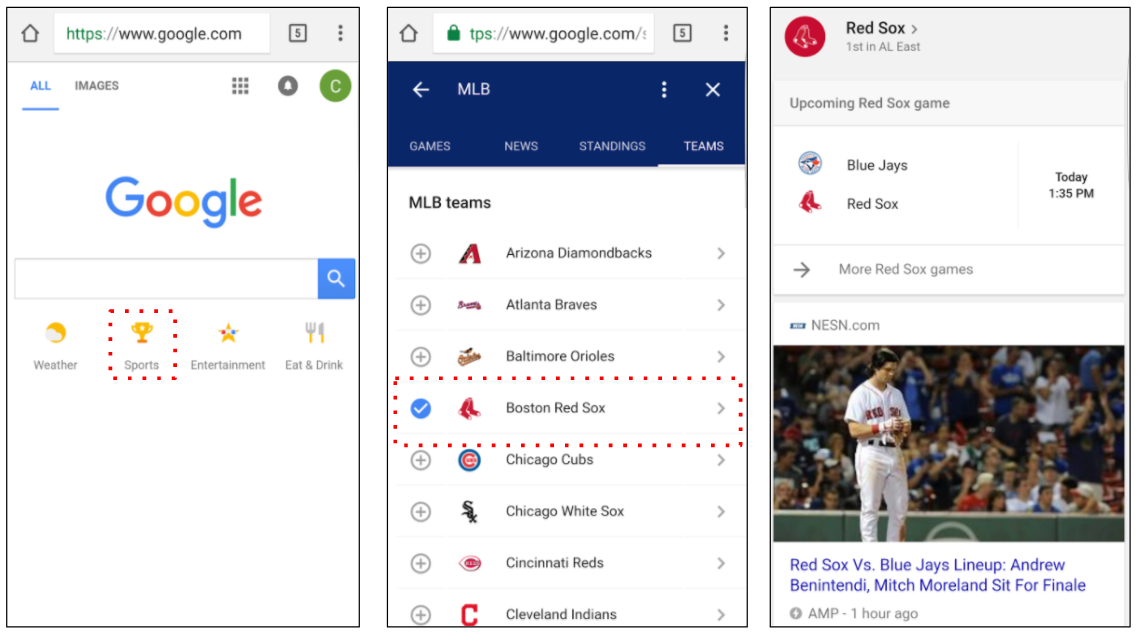
On the Google.com website (via a mobile device), there are now four icon-based options: Weather, Sports, Entertainment, and Food & Drink.

The ‘Weather’ and ‘Food & Drink’ options can be used straight away, as they take the user’s location data to provide targeted results. The ‘Sports’ and ‘Entertainment’ options require a little more customization before users can benefit from them fully. Without this, Google will just serve up popular and trending stories within each category.

In the example below, I tapped on the ‘Sports’ icon, then selected to follow a baseball team, the Boston Red Sox. Based on this preference, Google then knows to show me updates on this team on my homepage. The results varied in their media format, with everything from Tweets to GIFs and videos shown in my feed.

This means that rather than encountering the iconic search bar, Google logo, and the unadorned white interface we have all become accustomed to, each user’s feed will be unique. As I start to layer on more of the topics I am interested in, Google gains more information with which to tailor my feed.

On the Google mobile app, based on my selection above, my homepage looks as follows:

This is quite a big departure and is an experience we should expect the Google.com website to mirror soon. For now, the latter retains enough of the old aesthetic to be recognizable, but the app-based version is more overt in its positioning of suggested content.

The trusty search bar is still there, but users are encouraged to interact with their interests too. The interface is designed for tapping as well as typing.

Sashi Thakur, a Google engineer, has said of the launch,

“We want people to understand they’re consuming information from Google. It will just be without a query.”

It is essentially an extension of the functionality that has been available in Google’s Android app since December. Google will also continue to use push notifications to send updates on traffic, weather, and sports, based on the user’s set preferences.

Why is Google launching this product now?

Google has struggled to find a significant commercial hit to rival its hugely lucrative search advertising business. That business relies on search queries and user data, so anything that leads users to spend more time on Google will be of significant value.

The same motive has led to the increased presence of Google reservations, which now allow users to make appointments for a range of services from the search results page.

As Google stated in their official announcement, “The more you use Google, the better your feed will be.”

Users type a query when they have an idea of what they want to find; Google is pre-empting this by serving us content before we are even aware of what exactly we would like to know. By offering a service that will increase in accuracy in line with increased usage, Google hopes users will get hooked on a new mode of discovering information.

This also allows Google to incorporate a number of other initiatives it has been working on, such as fact-checking and Google Posts.

You’d be forgiven for wondering whether Google is trying to find its way into social media again. After the demise of the short-lived Google+ platform, Google has seen Facebook grow as a credible threat in the battle for digital advertising dollars.

Facebook’s algorithmic news feed has been a significant factor in its rise in popularity, and with Google Posts incorporated into this news feed, there are certainly elements reminiscent of a certain social network in Google’s new homepage initiative. Readers may also recall the launch of iGoogle in 2005, a similar attempt to add some personalization to the homepage.

That said, it seems more likely that these changes have been rolled out in response to recent launches from Amazon than as a direct challenge to Facebook.

Amazon has made an almost dizzying amount of product announcements and acquisitions of late. As a pure-play ecommerce company, their rapid growth will have been cause for consternation at Google and there is a need to respond.

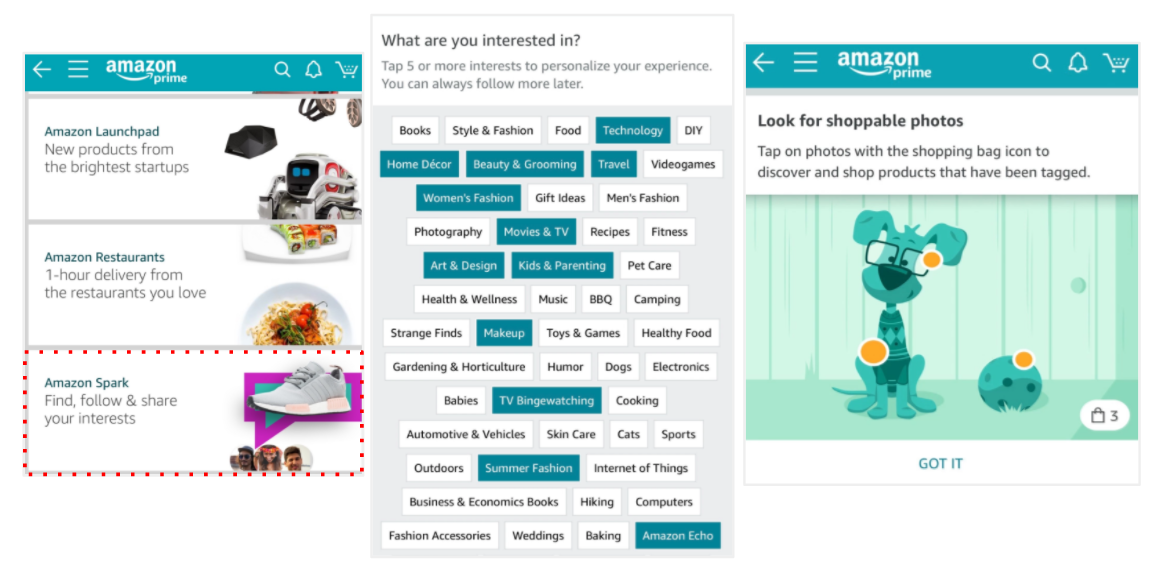
Of particular interest in relation to the new Google feed is the very recent launch of Amazon Spark, a shoppable feed of curated content for Amazon Prime members. It is only available via the iOS app for now, but it will be launched on Android soon too.

Spark is a rival to Instagram in some ways, with its very visual feed and some early partnerships with social media influencers. It is also similar to Pinterest, as it encourages users to save their favorite images for later and clearly tries to tap into the ‘Discovery’ phase that Pinterest has made a play for recently.

Amazon has also launched its ‘Interesting Finds’ stream, which works in a noticeably Pinterest-esque fashion:

Google has taken aim at Pinterest with its ‘Similar items’ feature and its revamped visual search technology, which feeds the new Google Lens.

In Google’s announcement of the new homepage, they make use of the verbs “discover” and “explore”. Both Amazon and Pinterest have tried to shape and monetize these phases of the search-based purchase journey; Google evidently thinks its homepage needs to take on a new life if it is to compete.

Will it open new opportunities for marketers?

Almost certainly. We should view this as a welcome addition to the elements of current search strategies, with a host of new opportunities to get in front of target audiences.

Google is not launching this product because of any existential threat to its core search product, which still dominates Western markets:

Source: Moz/Jumpshot

The update should encourage a shift in user behavior. As people get used to the new experience, they will interact with Google in new ways and marketers need to be prepared for this.

From a paid perspective, we can expect to see new options open to advertisers, but not in the immediate future.

Amazon has two innate monetization mechanisms within Spark: users have to sign up to Prime (for an annual fee) to get access and, when they do, they are served a shoppable list of results. It comes as no surprise when we are on Amazon that we will be asked if we want to buy products.

That is not always the case on Google, where the initial purpose of the news feed is to gain traction with users and encourage them to spend more time within the site.

Options for sponsored content and (almost inevitably) paid ecommerce ads will come later, once a large and engaged user base has been established.


from https://searchenginewatch.com/2017/07/21/what-do-we-know-so-far-about-googles-new-homepage/

source https://kateninablog.tumblr.com/post/163280332144

Friday, 21 July 2017

Here’s How to Perfectly Optimize Your Infographic for SEO

Infographics are amazing!

Besides being one of the best ways to explain a complicated topic with ease, they make information come alive.

Research found,

people following directions with text and illustrations do 323 percent better than people following directions without illustrations.

illustrations help with instructions.pngt1498744342631width669height287nameillustrations help with instructions

Maybe that’s why “infographics are ‘liked’ and shared on social media 3x more than any other type of content.”

And the concept of relaying information through visuals is nothing new.

If you think about it, cave paintings and hieroglyphics dating back to 30,000 BC accomplished the same thing.

They were far less sophisticated but demonstrate just how hard-wired we are when it comes to visual information.

So it’s easy to see why infographics have become so ingrained in content marketing.

They get results!

Unbounce even went so far as to say “infographics are the most powerful tool in your content marketing arsenal.”

0 ci7OKnRNSWt4xkheTOeA

And like with any piece of content you create, you’ll want it to be SEO friendly.

But here’s the thing.

Doing SEO for an infographic demands a slightly different approach than the one you would use for a conventional blog post.

In this post, I explain the most vital components of infographic SEO to ensure yours gets proper visibility in the SERPs.

The biggest hurdle

Let me start by saying infographics are technically just images.

They are typically saved in image formats such as JPEG, PNG, GIF, etc.

infographic template design 1270 51.jpgsize338extjpg

Of course, they’re much more robust and contain far more information than a regular image, but that’s how Google views them.

This is important to know because Google can’t “read” images like it can text-based content such as a blog post.

Fortunately, there are several other elements that you can optimize.

Start with keyword research

You won’t be able to take advantage of keywords in the actual body of an infographic, but there are a few areas where you can insert keywords.

That’s why you’ll still want to do some keyword research to identify a primary keyword phrase as well as a couple of secondary phrases to target.

Let’s say I was planning on creating an infographic about productivity hacks.

A quick search on the Google Keyword Planner shows me that “productivity hacks” is low competition, which is good.

eJIhhzbZTh6PPoeSCBXqTw

The only issue is that it’s a short-tail keyword with only two words.

But I could still probably make it work, especially if I added “infographic” to the end of “productivity hacks.”

In terms of secondary keywords, there are a few possibilities.

6Lg1KpdlQ2GA20 tEcpPnw

The bottom line here is to perform keyword research like you would for any other type of content.

The only difference is how you go about inserting those keywords.

File name

Selecting the right file name is vital.

This is one of the main factors that Google will analyze to determine what your infographic content is about.

You need to get it right.

I shouldn’t even have to say this, but you’ll obviously want to stay away from anything generic like Image001.png.

This tells Google absolutely nothing and is going to be a strike against your infographic SEO.

A better choice would be something like productivity-hacks-infographic.png.

It’s short and sweet and lets Google know exactly what your content is about.

Just make sure you’re not doing any keyword stuffing, using the same phrase multiple times or anything else that’s spammy.

But you already know that.

Alt text

Equally important is your alt text.

This is the text alternative of an image that lets someone know what an image contains in the event that it doesn’t load properly.

Screen readers for the blind and visually impaired will read out this text and thus make your image accessible.

More importantly, this gives you another opportunity to explain to Google what’s in your infographic.

Just follow best practices for your alt text and describe as succinctly as possible what your infographic is about.

In this case, I might want to use “Infographic explaining 15 productivity hacks.”

URL

Your URL is important for obvious reasons.

As I mentioned in a post from NeilPatel.com that referenced Google’s top 200 ranking factors from Backlinko, when it comes to the significance of URLs, here is what we know:

  • URL length is listed as #46
  • URL path is listed as #47
  • Keyword in the URL is #51
  • URL string is #52

I’m not going to cover the nuts and bolts of URL optimization here.

You can find that in the post I just mentioned.

But I will tell you that you want to aim for a short URL that contains three to five words and a max of 60 characters.

This advice comes directly from an interview with Matt Cutts, so you know it’s gold.

image21 3

When it comes to keywords, be sure to include one or two of them in your URL.

Research from John Lincoln and Brian Dean found that this is the sweet spot and considered as part of URL keyword best practices (at least for the time being).

H1 tag

Although you can’t capitalize on the H1 tags (or H2s, H3s, etc.) in the body of your infographic, you can still place one above your infographic so Google can “read” it.

Here’s an example:

ecF5SyAKSyiJaSOL Fcg7Q

See how the same keyword phrase that’s in the actual infographic is used as an H1 tag at the top?

This is a simple yet effective way to give your infographic a bit more SEO juice.

While H1s may not be as big of a ranking factor today as they were a few years ago, they certainly don’t hurt.

And they can be especially helpful for infographics where you have a limited amount of text to work with.

Meta description

Ah, the good ol’ meta description.

Here are a few best practices to adhere to when creating one for your infographic.

  • It should be between 135 and 160 characters in length.
  • It should include your keyword phrase (once).
  • It should accurately describe the content within your infographic.
  • It should have a CTA at the end to encourage search engine users to click on your content.

Getting it just right should make your infographic go further with Google and help you rake in more organic traffic.

For more on creating a killer meta description, I recommend reading this post from Yoast.

Supporting text

I really like hacks, shortcuts, loopholes, etc.

Call them what you will, little tricks like these are what help you gain the edge on the competition.

And there’s one specific hack I would like to point out in regards to infographic SEO.

It’s simple. Add some supporting text at the beginning.

Here’s a great example of what I’m talking about:

aUcwb7R2QoeNqpnmE43SDQ

Notice that it’s nothing fancy.

It’s just a few paragraphs that expound upon the infographic and offer a quick preview of what it’s about.

This is helpful for two reasons.

First, it provides a brief description for human visitors, which should hopefully pique their interest and make them want to check out the infographic.

Second (and more importantly), it supplies Google with additional text to crawl and decipher meaning from.

This helps your infographic get found and increases the likelihood that it’s indexed under the right keywords.

So it’s a win-win situation.

There’s no reason to go overboard and write 1,000 words of supporting text, but 100 words or so can be a great help.

An added plus is that you can throw in a couple of internal links to relevant pages on your website.

Don’t force it, but try to work in some internal links as well.

Load time

Back in 2010, Google announced that page speed was a ranking factor.

Content that loads quickly will get preference.

Not only that, a faster load time tends to translate into a lower bounce rate, more time spent on your site and so on.

The point I’m trying to make here is that you should be conscious of how long it takes your infographic to load.

Keep in mind that infographics are fairly bulky images, so this can definitely be a concern.

Generally speaking, PNGs, GIFs, JPEGs, BMPs and TIFFs load the fastest, so keep this in mind when choosing a file format.

You can also test the loading speed of your infographic with this free tool.

Just type in the URL.

IPG9IYKHRQq9g7hXmiEp8Q

Then click “Analyze.”

6bYcoN6kT166y780cCNCmg

Google will analyze it and grade it.

If there are any issues, Google will provide you with specific advice for speeding it up.

Conclusion

Doing SEO for an infographic isn’t dramatically different from doing SEO for any other type of content.

It incorporates many of the same techniques and strategies.

The main thing you have to work around is the fact that an infographic is an image and therefore Google can’t “read” it like it can regular text-based content.

Fortunately, there are several ways to get around this and ensure your infographic is perfectly optimized for search engines as well as humans.

By covering all the bases, you’ll position it to climb the rankings and achieve maximum visibility in the SERPs.

Do you have any other recommendations for doing SEO for an infographic?


from http://feedproxy.google.com/~r/Quicksprout/~3/T3DWqZLRVuI/

source https://kateninablog.tumblr.com/post/163261384319

Wednesday, 19 July 2017

How to effectively combine online and offline lead generation

We have two primary forms of leads: online and offline. This article talks about how to combine online and offline marketing for more efficient lead generation.

In today’s world we are mostly narrowing in to online leads, thanks to the Internet essentially opening up the entire world for us to peruse. But offline leads should still be a factor we consider moving forward.

Looking at the two it is easy to see that online leads are going to be the more important source of generation. It produces the most, after all.

That isn’t an excuse to ignore the harder work involved in offline lead curating, as that will ramp up your marketing benefits by leaps and bounds. Especially in terms of B2B interaction – something that we should all be trying our best to take advantage of.

Bringing offline and online lead generation together

Finding ways to combine offline and online leads isn’t nearly as difficult as it sounds. Actually, the two really help the other to succeed.

Here are some ways you can start making each work for the other, making your marketing strategy more effective than ever before.

Online lead generation helps more informed offline marketing decisions

Cold calling has got too old. Online marketing has turned the things around: These days you can make sure your lead is ready (and even waiting) for your sales call. Here are a few examples of how your online lead generation efforts can lead to more “offline” deals.

Leadfeeder lets you identify companies behind your website logs and provides you with detailed contact information for you to build that connection further. Normally, a combination of online and offline relationship building works best. For example, you can engage with the lead on social media and then bring that connection offline by giving them a call.

Leadfeeder

Offering free downloads or a free product prior to getting in touch could be even more powerful. For example, at Internet Marketing Ninjas, we give away free case studies and whitepapers and have a nice private dashboard where we can see what exactly was downloaded by a particular lead. This helps our sales team to put together a more targeted proposal before giving this lead a call.

Giving away freebies (free services or products) is another effective option here, and it can be less work than you may think. As an example, SE Ranking allows marketing companies to install a lead generation widget for visitors to request a free report. The free report will be generated, white-labeled and sent to the prospect automatically by SE Ranking and as a result you have a qualified lead with no work done (apart from attracting that visitor with your content).

From here on out, you can get in touch with the customer by phone and hopefully get a deal:

Seranking lead generation

Salesforce provides more ways to qualify your leads automatically before you reach out to them offline. Once leads begin to respond to nurturing efforts and their scores increase, you can automatically assign them to sales for follow up.

Salesforce

Use social media listening to better under understand your customers

Social media provides a lot of opportunities for businesses to understand their customers better and thus build their offline lead generation strategy accordingly. What questions do your customers ask on social media? What do they think about you or your competitors? How can you design their offline experience to serve them better?

Brand24 is one of the most powerful social media listening platform allowing you to find online leads, identify where to promote your products and find customers before they find you. It provides one of the most powerful sentiment analyses on the market – and lets you snatch leads from your competitors by being the first to engage with their unhappy customers.

It also integrates nicely with Slack allowing your whole team to better engage with social media leads more efficiently (and learn more about your customers too!).

Brand24

Make your offline marketing materials link to your online assets

Let’s say you create a stack of physical brochures that you are giving out at a trade show. You don’t want to make people work to find you online… make it easy for them! Or maybe you have business cards to give out. Your website should be right there, easy to see, the URL clear.

Businesses have been utilizing this marketing tactic for ages now. Yet, many of them still need a reminder. Here’s an old Mashable post encouraging businesses to design social-media-friendly business cards, for example.

Canva is an easy way to design online marketing materials which you can also re-use offline:

Canva

Social media pages are also a great inclusion, as it ties in all your sources of leads nicely. If you give out other promotional items, such as pens, magnets, keychains, etc., make sure they also reflect your online presence.

Start looking for community outreach opportunities

Recently there was a local art fair put on downtown in my city. The booths were mostly local companies and artists, but among them were some huge names in the telecom, financial and medical business. They were giving away free items, holding contests and answering questions from people visiting their booths.

I have seen these same brands at other community events such as library gatherings, unveilings, and charity auctions. All of them promoted those appearances heavily online ahead of time and used the chance at being face to face to take photos and run social media contests. It is great PR.

To get you inspired, here’s a neat example of an “offline” event utilizing Twitter marketing: in 2015 Pubcon organized “Pregame Twitter Tailgate Party” contests, giving away prizes for the best tweets promoting the conference.

Online tools provide a great way to organize and funnel those leads before you reach out to invite them to become part of your competitor. I use Salesmate to organize leads that integrate well with my favorite online apps:

Salesmate apps

Get to those conventions on social live feeds

This is my favorite tip on this list. Social media sites like Youtube, Twitter and Facebook allow you to livestream. So the next time you are at a big convention or floor show, make sure you are showing your followers.

Hype up a hashtag to follow for a couple of weeks in advance, take questions or run interviews and show your followers what is going on. It is a great way to catch some attention where otherwise you might have been ignored. Plus it shows people at the convention who you are, as well.

There’s a great guide over at Convince and Convert on how brands are using streaming video for conference marketing. As an example, Nissan streamed the launch of its 2016 Maxima at the New York auto show and Dunkin Donuts summer music effort across seven platforms, including Periscope and Spotify.

Beautiful together

Online and offline lead generation are not at odds. They are a chance to combine your efforts for greater value! Start including both in your marketing campaigns and you will be amazed at how much more productive those efforts will be.

Have a tip for combining online and offline leads? Let us know in the comments!


from https://searchenginewatch.com/2017/07/19/how-to-effectively-combine-online-and-offline-lead-generation/

source https://kateninablog.tumblr.com/post/163203543639

How to Get Your Content to Rank for Seasonal Keywords

When you hear the phrase seasonal keywords, what comes to mind?

Is it Black Friday, Cyber Monday, Christmas and general holiday-related keywords?

Well, that’s definitely part of it.

Of course, you’ll want to put the extra energy into optimizing your keywords for the holidays.

After all,

holiday retail sales during November and December brought in $658.3 billion in 2016.

This translates into holiday retail sales representing 20% of total retail industry sales.

But there’s a lot more to it than that.

When I say seasonal keywords, I’m referring to any particular time of the year when there’s a spike in a particular search phrase and when there’s a predictable increase in sales in a given niche.

Some examples include:

  • Valentine’s Day
  • Mother’s Day
  • Father’s Day
  • 4th of July
  • Back to school
  • Halloween

You get the idea.

See, there are opportunities abound throughout the entire year for SEO marketers.

It’s simply a matter of capitalizing on trends and using seasonal keywords to your advantage.

I would like to share with you a formula I’ve developed for identifying seasonal keywords and getting your content to rank for them.

This way, big opportunities for increasing your overall sales won’t be wasted.

Use Google Trends for research

The first thing you’ll want to do is go to Google Trends.

It truly is a marketer’s best friend and is jam-packed will all kinds of helpful insights.

To begin, type in the seasonal event you’re interested in.

I’ll use Father’s Day as an example:

xzt5ww0BRuqml45ocLw kQ

After pressing “Enter,” here’s what I get:

fFQgyERYSdqVLBMFus8cjQ

Scroll down just a bit, and you’ll see two important sections: “Related topics” and “Related queries.”

JDYf1rHvSIWwBLPB4cLn5A

Both serve as a great starting point because you can look at the data from previous years to determine what types of Father’s Day-related searches people use the most.

Click on the right arrow at the bottom to browse through the rest of the list:

kBdyLL WQSSNvAXhdaMDyQ

This will quickly give you a sense of what people are interested in and searching for as it relates to a particular seasonal event.

For instance, I might be interested in “Father’s Day gifts”:

w6WsQ3ZATQOtWWoQL7ilqQ

It could serve as a topic I could potentially create content around.

Plugging a broad keyword into the Google Keyword Planner

Let’s say after a little research on Google Trends, I’ve found a broad keyword I’m interested in.

I know for a fact people have searched for it in the past, so I know they’ll be searching for it this year as well.

What you want to do now is plug that broad keyword into the Google Keyword Planner for a larger list of keyword ideas.

Type it in under “Your product or service.”

6z9j8YJbSjmjhiLRNgPtAA

Click on “Get Ideas” at the bottom:

sRnuA0ptT mr41fpAcbAew

Here’s what I get:

x64RZHcETfaw62BWZEG5eg

The first results don’t look all that great because they’ve all got a high competition level.

That’s a problem for many industries, so I’ll need to do some extra searching to find the diamond in the rough.

After scrolling down some more, I begin to see some keywords with lower competition, like this one:

yqGrAo4fRAWjX2vm2OHFgA

Ideally, you’ll choose long-tail keywords because this means less competition and often a higher conversion rate.

This is the heart of smart keyword research.

And remember: 70% of all search traffic involves long-tail keywords.

long tail keywords traffic volume

That’s almost always your best bet.

This is a really simple example, but this formula will work for virtually any seasonal event.

Just start with Google Trends to find a broad keyword.

Then plug it into the Google Keyword Planner to fine-tune it, and find a long-tail phrase you have a strong likelihood of ranking for.

To cast a wider net, you may want to repeat the process a few times until you have a handful of keyword phrases at your disposal.

Using Ubersuggest

Here’s another tip.

Ubersuggest has a nice little feature that can give you some additional ideas.

Here’s how it works.

Go to the Ubersuggest homepage.

Type in the seasonal event.

TRBWJP9WSKWBx10AlymTIQ

Click “suggest.”

c5XQNGg RMeq0Y4M6rSWSQ

You’ll see this:

pH1EsoOhR02Vtt5LyzWfmw

Now click on “Word Cloud.”

UsCS24frRCaFjsXAxnth1Q

Here’s what I got:

V57yh712TgqYs27qM0ARqA

This is another simple way to see which keywords related to your seasonal event are commonly searched for.

The bigger the word, the more often people include it in their search queries.

I find this can be a nice way to round off your keyword research, and Ubersuggest will provide you with just a bit more data.

Sometimes, you can insert one or more of these keywords into your overall keyword phrase.

Creating your content

At this point you should have an understanding of what some of the most popular searches are and have at least a few long-tail keywords.

Now, you’ll want to base your content around those searches and keywords.

I probably don’t need to say it, but you’ll want to create robust, comprehensive content that’s better than that of at least 90% of your competitors.

You’ll also want to include plenty of images and data whenever it makes sense.

I suggest doing a quick Google search to see what you’re up against to ensure you kill it with your final product.

In terms of content length, you can use this post from NeilPatel.com as a reference point.

It highlights how long your blog articles should be by industry.

You may also want to learn about the skyscraper technique from Brian Dean if you haven’t done so already.

And don’t think you have to limit yourself to a conventional blog post.

There are plenty of other content options.

Here’s what’s trending with B2B marketers in 2017:

b2b20content20marketing20tactic20usage.pngt1494423916031width690height699nameb2b20content20marketing20tactic20usage

Video marketing is scorching hot right now and is a medium I suggest experimenting with.

Knowing when to post your content

Besides simply finding the right seasonal keywords and creating killer content, it’s essential you post your content at the right time.

This is a biggie, and you need to strike while the iron is hot.

But how do you know when to post?

To find out, you’ll need to go back to Google Trends and do the following.

After searching for a seasonal event, you’ll see a series of options directly above the graph.

Click on the down arrow beside “Past 5 years.”

Xw l jFRlSB5khbmRRPrw

This will allow you to set the date and choose how far back you want to go.

I recommend searching last year’s results because it’s an easy way to tell when people really start searching hot and heavy.

Click on the “Past 12 months.”

4buXs2xbSAiHBs5NWyonMA

Here’s what pops up:

vBFHBYitSeG4q56AUNryiw

All I have to do now is determine when the trend in Father’s Day-related searches begins.

In 2016, things started picking up between May 7 and May 13 and peaked between June 11 and 17.

This tells me my content needs to be ready to go by May 7 in order to take full advantage of the spike in searches.

But, of course, I’ll want to have it posted at least a couple of weeks in advance.

That’s because it can take Google anywhere from four days to four weeks to index content.

So, you’ll want to give it some time to simmer.

I tend to err on the side of caution, so I would probably aim for posting my content somewhere around April 7.

This should ensure everything has time to get indexed and claim its rightful place in the search results.

However, if you were in a crunch, you could push it to the beginning of May.

But keep in mind this could reduce your content’s impact and probably wouldn’t bring nearly as much organic traffic as it would otherwise.

Planning in advance

The key to targeting seasonal keywords successfully and raking in big traffic is to stay ahead of the game.

You don’t want to do this at the last minute. That’s only going to minimize your impact.

If possible, do some initial planning a few months beforehand.

In the case of Father’s Day, which occurs in mid to late June, I would want to start planning sometime around March or April.

This would ensure I have adequate time to perform my research, select my keywords, create my content, post it and allow Google to index it.

That way, I don’t have to rush or stress myself out.

Do whatever makes the most sense to you, but try to think ahead.

Otherwise, it’s like cramming for a huge test the night before.

Seldom does it end well.

Conclusion

Seasonal keywords are a gold mine.

And remember: this goes way beyond just the holiday season.

Depending on your niche, there are opportunities to crush it year round with seasonal keywords.

The best part is the formula is quite simple.

It’s a matter of gauging interest, figuring out popular search trends and doing keyword research like you would for any other piece of content.

From there, you just need to be sure you publish your content with enough time for Google to index it and before people start searching on a mass scale.

Have you ever cashed in on seasonal keywords before?


from http://feedproxy.google.com/~r/Quicksprout/~3/cZpuGBbvnPk/

source https://kateninablog.tumblr.com/post/163183484894