Monday, 31 July 2017

How to optimize for user intent in search

User intent. Also known as searcher intent, it is a theory that unashamedly stands up to the more primitive pre-Penguin and Panda tactics of optimizing purely for keywords.

User intent and optimizing for it has come into being via a combination of three key factors:

  • Latent Semantic Indexing, Hummingbird, Rankbrain. All have fantastic and mysterious sounding names but all underpinned by the fact that Google’s algorithm is not exactly made up of high school algebra. Google is clever, real clever. The algorithm understands more than just the specific keywords that a user types into the search bar.
  • As a result of the aforementioned ability, people trust Google. They may not trust them as a business that will pay their fair share of tax but they trust the search engine to understand their query and as such will ask more complex questions rather than utilising pure keywords. To ‘Google’ is a verb in the Oxford English Dictionary!
  • The internet and Google (among other search engines) have made unfathomable amounts of information accessible to the masses. As a by product, Google is often the first port of call for more than just purchasing actions. More on this later.

Voice search has further stamped on the throttle for user intent with more and more never before seen searches due to the conversational nature of voice search. As such, if you are still basing your SEO strategy around keywords you should probably start to think a little bit deeper around user intent.

Finally, and this is an important one. Optimizing for user intent is not just about providing solutions or using synonyms. The majority of SEO campaigns are built around driving revenue and whilst rankings are great and indicative of campaign success, in reality you won’t retain clients without providing ROI.

Fully optimizing for user intent requires an understanding of how your potential customers buy via your inbound marketing channels. As a result, make sure that you have identified these sales funnels as they are crucial for capitalizing on optimizing your website for user intent in search.

User intent: An overview of the basics

What is user intent? In short it is the reason why someone is searching for something in Google. What are they actually trying to achieve as a result of typing (or saying) that search term?

Traditionally, the intent has been categorized as either navigational, informational or transactional although some like to define commercial intent or use different terminology such as ‘to buy something’, ‘to do something’, ‘to find something’, ‘to learn something’, ‘to go somewhere’ and so on.

These questions or intents can then help to you to identify your Buyer Personas and the stage that they are at within your inbound funnels. Again, various inbound funnels utilize different terminology, but I am a fan of Hubspot’s methodology:

Image credit: Hubspot

How do you figure out what the user intent is behind a search term? Honestly, it’s pretty easy. Just about everyone uses Google. Put yourself in the searcher’s shoes and ask yourself, “if I used that search term, what would I be looking to do?”

Also look at the types of search results that Google returns for a given search term; this is a great indicator of the user intent that Google itself attaches to that particular query.

Focus on VALUE for the user

Even if you don’t read on, here is a very simple tip that should permeate your entire SEO strategy. Ask yourself this question:

Does what I’m doing here add value for the user and if so, how can I make it as valuable as possible?

If you are taking into account what your user is looking to achieve and therefore providing as much value for the user as possible (forget SEO and rankings for one second), you will put yourself in a great place to have a successful campaign both now and into the future.

It is the primary focus for Google as a search engine, so you should make it your focus as well!

An easy place to start is evaluating each piece of content that you are writing. Does it complete the journey that the user is taking? If not, are there quick call to actions to pages that will? Your content will preferably be the former, providing solutions and value directly to the searcher.

In addition, if you continue to put the user first (instead of being keyword-focused) you will naturally create better, deeper, more complex and solution led content, thus satisfying the aforementioned LSI, Hummingbird and Rankbrain. Write for search engines first and you run the risk of lowering the content quality, in turn lowering the quality of your results.

How to align your SEO strategy with user intent

Targeting transactional search terms

For years SEOs have focussed on the sharp end of the funnel. and for good reason: the search terms with transactional intent bring in revenue. Let’s be clear, these search terms should remain a staple of any website focussed on ROI.

However, there are a few optimization tips associated with transactional search terms. As above, they are all focused around value for the user:

  • How easy is it to make a purchase from that specific page?
  • Are the call to actions clear?
  • Have you provided the user with all the information required to make that purchasing decision?
  • Is the language used focused around the purchase?

As SEOs, we have to make it abundantly clear to Google that if someone types in a purchase based search term, that our page is the very best result for that search term.

I hate to hammer it home, but it is the webpage that will complete the desired outcome for the user and therefore offer the most value.

Targeting informational search terms

This is where a sit down with the team and the drawing up of a content strategy that is aligned to your user intent (and therefore inbound funnels) can unlock serious content marketing magic.

Real results you say? Surely informational searches only result in you giving away free information? Exactly.

Let me take you all the way back to the inbound methodology and the fact that people use Google as a source of information. Creating great informational content can have the following impact:

Providing value earlier in the consumer buying process

They may be wanting to research a product or service prior to making that buying decision. The more awesome information you give them the more aligned with your brand they become. When the time comes for that purchasing decision guess who they will lean more favorably towards? Of course there is a little caveat in that all other things are equal.

Earning links

Even if no sales come as a result of your informational content (unlikely), if it is good enough it will earn links as people reference the content…funnily enough to provide further value for their own users. These links will subsequently improve the authority of your website and help you rank for transactional search terms. It’s a warped digital version of karma.

Understand your user flows

This is particularly relevant for transactional and informational search terms. Top notch SEO incorporates more than just onsite optimization, content creation and link building. It should pull in all marketing channels, including design. It’s all well and good generating traffic, but it counts for nothing if the website does not convert them.

Identify your key user flows and actions that you want your users to complete on your site according to where they are in the funnel. Are they an informational searcher? The website needs to encourage them to continue their hunt for information on your website or start to transition them further down the funnel to a purchasing decision.

Really understanding user intent and user flows will only help you with your conversion rate optimization.

Adjust your appearance in search

In the same vein as design supporting CRO, your appearance in search should be aligned with the user intent. The two standard influencers here are your title tag and meta description, although additional factors such as schema markup can also be implemented.

For example, if the search term is transactional make sure that the metadata is enticing and using purchase driven vocabulary. Whereas if the search term is informational make sure that it hints towards how the information on the corresponding web page will solve the searchers’ problem.

Use your outreach skills

I thought we were talking about content here? Yes, on the whole we are but there are opportunities within link building as well. Some users will turn to Google not simply to provide them with the best result, but also a list of the options available to them. Common examples of how a small change to the wording can result in this alteration to user intent are as follows:

Tailor London > Best Tailor London
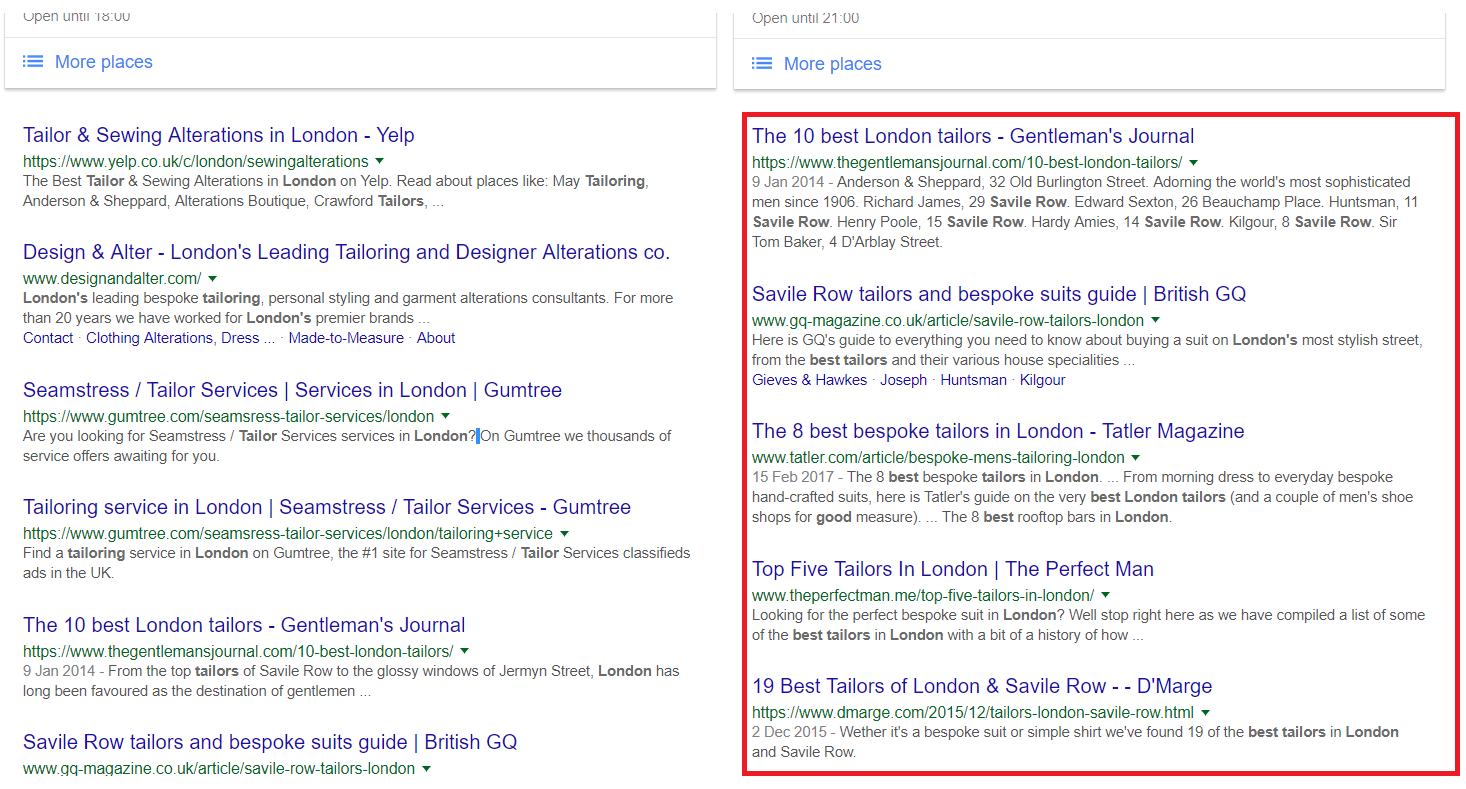
Or

Tailor London > Tailors London
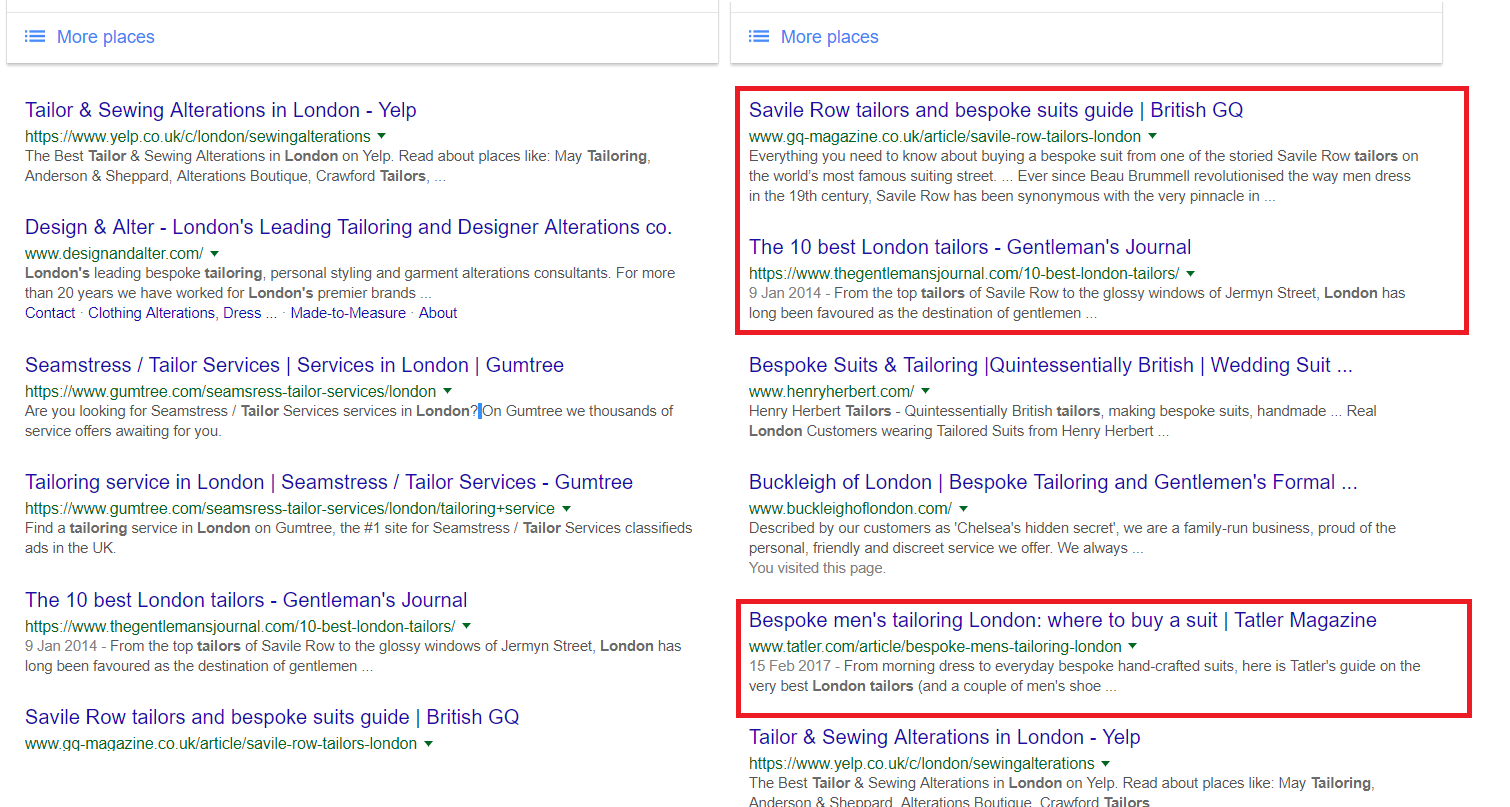
The addition of an adjective or the plural version of a keyword can often result in lists being supplied by Google. Not all of the results will be these lists, but for those not already in the top results they do offer an opportunity.

Contact these sites to get listed – we saw a considerable increase in conversions by doing this for a software platform client recently.

Don’t forget local search

Mobile search vs desktop search is a mainstream conversation nowadays, with some stats showing that mobile search has a 75% chance of action being taken by the user.

With this in mind, don’t forget to optimize your local listing in order to sweep up all of the traffic (over 50% globally now) using Google via mobile devices.

Some useful tools

Keyword research is critical in identifying valuable search terms, whatever the corresponding user intent is. We have listed a few options below, hopefully you are already using these tools alongside Google’s Keyword Planner, Moz’s Keyword Explorer or whichever tool you use to look at traffic. These tools can provide content ideas that will drive your campaign:

Answer The Public

Using a who, what, when, why, how style format, Answer The Public will give you a list of search terms. Use these prompts to create content ideas.

Keywordtool.io

In a similar vein to Answer the Public, Keywordtool.io will display search volumes (if you pay for it) and commonly asked questions that relate to your keywords.

Buzzsumo

Buzzsumo allows you to view the most shared pieces of content via social for a given subject. Don’t just rely on data fed to you, check how popular these subjects are in real life!

Google Autosuggest

Use Google’s own user oriented functionality to understand the commonly asked questions and search terms for a given subject. Start typing and let Google do the rest.

Impressions via Search Console

We always warn against purely using Search Console and Google Analytics data as the basis for decision moving forward, purely because it is reactive data.

However, you can look at search terms for which you are gaining impressions but potentially a low CTR and adjust the content accordingly. It may be as simple as making your metadata more attractive in the SERPs.

Horses for courses

The base theories will have to be adapted slightly to suit your particular needs. Some businesses may focus on impulse buys where others are deemed comparison goods and will benefit more from informative, longer sales processes. It is a ‘horses for courses’ scenario.

If you understand what you are trying to achieve via your SEO campaign, the journey taken by your user during the buying process, the various relevant searcher intents and align your strategy accordingly, it will place you in a great position to increase organic traffic and also your conversion rate.


from https://searchenginewatch.com/2017/07/31/how-to-optimize-for-user-intent-in-search/

source https://kateninablog.tumblr.com/post/163651950509

Saturday, 29 July 2017

Should You Be Worried About The Next Google Algorithm Change?

“Everything changes and nothing stands still.”

In this quote, Heraclitus of Ephesus was referring to life and the fundamental order of the cosmos.

But he might as well be referring to Google’s chronic algorithm updates, even if he was a few centuries early.

See, Google makes roughly 500 – 600 changes each year.

Some are major, some are minor.

Some are confirmed, some are unconfirmed.

But Google is cranking them out left and right.

Even on the low end of 500 changes each year, this means 1.36 changes occur every single day.

Google is basically tweaking its algorithm all the time.

Here’s a chart that highlights some of the more serious changes of the past six years:

SEO Tools to Check Google Algorithm Updates and Changes

Of course, only a fraction of algorithm changes create any real stir.

Most of you don’t even know they happen.

But this constant flux is enough to put a lot of marketers on edge.

Even if you reach a top ranking position for a great keyword, there’s no guarantee you’ll stay there.

A single update could send you plummeting into no man’s land.

I understand this can be a little unnerving.

But is this fear really justified?

Should you be worried about the next Google algorithm change?

In this post, I offer my input on this topic and explain how you can protect your site from incurring Google’s wrath.

The frequency of major updates

Okay, so we’ve established that Google is constantly making adjustments.

It’s how it continues to dominate the search engine market:

Search engines by market share

If it remained stagnant, a competitor would inevitably overtake it.

But what we really need to know is just how many updates are major.

By major I mean resulting in a serious shakeup where hundreds of thousands, or even millions, of sites are affected.

According to Link Assistant, there have been nine major updates since 2011.

They are as follows:

  1. Panda – 2/24/11
  2. Penguin – 4/24/12
  3. Pirate – 8/12
  4. Hummingbird – 8/22/13
  5. Pigeon – 7/24/14
  6. Mobile-Friendly Update – 4/21/15
  7. RankBrain – 10/26/15
  8. Possum – 9/1/16
  9. Fred – 3/8/17

That means we’ve had 1.5 major updates per year in the last six years.

This isn’t to say minor updates can’t or won’t impact you, but there are only about 1.5 a year that are cause for any real concern.

Average traffic that comes from Google

Kissmetrics performed a study on over 18,000 small to medium e-commerce sites.

They found that “30.5 percent of all traffic was coming from organic searches on Google, Bing, Yahoo and other search engines.”

Considering that Google has 77.43% of the search market, this means that roughly 23.6% of small to medium e-commerce sites’ traffic comes from Google.

v YdvKQIRUqFg5B76hstIQ

In other words, just under a quarter of all traffic comes from Google.

I would say that’s significant.

Of course, this isn’t true for every website.

But this is what you can expect on average.

Should you worry?

Now we know the frequency of major updates and how much traffic Google sends to the average website.

But is this cause for alarm?

If Google decides to unleash a major update and you get penalized, would it put you in a full-on crisis situation?

Well, it depends.

The way I look at, there are three different factors you need to examine to determine your risk level.

Factor #1 – Your Google traffic

If your site is an outlier, where you get only a small percentage of your traffic from Google (say less than 10%), even the most brutal of algorithm changes shouldn’t have a major impact.

But if Google is your bread and butter, and you count on it to consistently send highly-qualified leads to your site, you could definitely be in trouble if you’re adversely hit with a big update.

This could send your traffic volume and sales plummeting.

It could look something like this:

9CZkPVaET2mJejDP9NyUaQ

Not good.

Factor #2 – User experience

At the end of the day, Google is interested in one thing: providing its users with the best experience possible.

If your website delivers a great user experience, you should be in pretty good shape.

No matter what Google throws at you, there should be a level of stability, and it’s unlikely that your rankings will see a dramatic drop.

Now, I realize that delivering “a great user experience “ is a wide umbrella open to plenty of interpretation.

But here are a few key elements that heavily contribute to it.

As we all know, Matt Cutts loves great content.

what kind of music do you like

This should be your top priority over anything else.

You also don’t want to have any spammy or manipulative links or barrage visitors with obnoxious ads.

Next, there’s functionality, which includes:

  • fast-loading pages
  • mobile-friendliness
  • intuitive navigation
  • clean interface
  • no disruptive popups

Factor #3 – “Schemey” SEO practices

It seems there’s always some “latest and greatest” SEO strategy popping up.

The promise is if you do X, you’ll be able to capitalize on some loophole and see a huge spike in your rankings.

While this approach may pay off initially, it often ends up hurting you in the long run.

I’m a firm believer in the “big picture SEO,” where you focus on the quality, user experience and fundamental SEO best practices rather than trying to game the system.

If you’re doing anything bordering on black-hat or even grey-hat SEO, it’s probably going to come back to haunt you.

black hat seo strategies

But if you keep your nose clean and maintain your integrity, you should be good to go.

How to protect yourself

Here’s the deal.

The next big Google algorithm change is imminent.

It’s going to happen.

It’s not a matter of if but when.

So you need to make sure your site is protected when the next major update inevitably rolls out.

But how do you do this?

Well, you can never completely predict what Google’s going to do next (they’re about as secretive as the CIA), but there are several measures you can take to prevent unnecessary penalties.

Here’s what I suggest.

Diversify your traffic sources

First, don’t put all your eggs in one basket.

Digital marketing has evolved to a point where you now have a buffet of options to choose from.

Organic search traffic is huge, but there are plenty of other ways to generate high-quality traffic that’s primed to convert.

Here are just a few ideas:

  • guest-posting
  • social media
  • videos
  • slideshows
  • podcasts
  • Quora
  • influencer marketing
  • email newsletters
  • PPC

Monitor your link profile

The links pointing to your site can make or break you.

Recent research suggests that “high-quality backlinks account for 30% of your overall page score in Google.”

ranking factors

I can’t stress enough how important it is to keep tabs on which sites are linking to you.

Low quality, irrelevant or spammy sites can be the kiss of death.

One tool you can use to see who’s linking to you is SEMrush.

Just enter your site’s URL in the search bar:

Ttc u4WvT7WptuPHTAEnCQ

Then click “Start now:”

4Re85OzPQdyiG0YstppN2A

Scroll down to the “Backlinks” section:

xiDMGOahTzOK8DWbOpglFQ

Click on “View full report” for more details:

e6M4AAWCSc6Jq6qtauTApw

You’ll then get a list that looks like this:

bF5P4L3sTG6zfhQscji5Sw

From there, you’ll want to browse through the list and check for anything questionable.

You can also use the Google Search Console for checking links, which you can learn about in this post.

If you need to eliminate any links, use the Google disavow tool. Learn more about the process of disavowing links here.

Create “future proof” content

Like I mentioned before, epic content is what Google is looking for when determining rankings.

If you can provide it, you’ll have a buffer against the impact of the next big algorithm change.

I realize this is easier said than done, but check out this post for 14 examples of truly epic content.

The basic recipe I use consists of the following:

  • long-form content (at least 1,500 words)
  • plenty of visuals
  • plenty of data
  • references to authoritative resources.

As long as your content hits its mark, there’s no need to live in perpetual anxiety of the next algorithm update.

For more on how to protect your site from Google penalties, I suggest reading this post from NeilPatel.com.

Conclusion

With so many brands heavily depending on Google for their traffic and ultimately sales, I see why so many people worry about algorithm changes.

The idea of your sales tanking because of an update is scary.

If you’re implementing the wrong approach and tactics, you’re putting yourself at risk, and there’s a strong likelihood your rankings will suffer at some point.

But if you understand Google’s logic and follow SEO best practices, there’s no reason to worry.

Sure, algorithm changes will come.

But you’ll be ready for them.

This way, you can keep things flowing and maintain a steady volume of traffic with minimal disruption.

What’s your experience with algorithm updates in the past? What do you do about algo updates now?


from http://feedproxy.google.com/~r/Quicksprout/~3/tbe22mzbht8/

source https://kateninablog.tumblr.com/post/163563404659

Friday, 28 July 2017

What does visual search mean for ecommerce in 2017?

Since the early 2010s, visual search has been offering users a novel alternative to keyword-based search results.

But with the sophistication of visual search tools increasing, and tech giants like Google and Microsoft investing heavily in the space, what commercial opportunities does it offer brands today?

Visual search 101

There are two types of visual search. The first compares metadata keywords for similarities (such as when searching an image database like Shutterstock).

The second is known as ‘content-based image retrieval’. This takes the colour, shape and texture of the image and compares it to a database, displaying entries according to similarity.

From a user perspective, this massively simplifies the process of finding products they like the look of. Instead of trying to find the words to describe the object, users can simply take a photo and see relevant results.

Visual search engines: A (very) brief history

The first product to really make use of this technology was ‘Google Goggles’. Released in 2010, it offered some fairly basic image-recognition capabilities. It could register unique objects like books, barcodes, art and landmarks, and provide additional information about them.

It also had the ability to understand and store text in an image – such as a photo of a business card. However, it couldn’t recognize general instances of objects, like trees, animals or items of clothing.

CamFind took the next step, offering an app where users could take photos of any object and see additional information alongside shopping results. My tests (featuring our beautiful office plant) yielded impressively accurate related images and web results.

More importantly for brands, it offers advertising based on the content of the image. However, despite the early offering, the app has yet to achieve widespread adoption.

A Pinterest-ing development

newer player in the visual search arena, image-focused platform Pinterest has what CamFind doesn’t – engaged users. In fact, it reached 150m monthly users in 2016, 70m of which are in the US with a 60:40 split women to men.

So what do people use Pinterest for? Ben Silbermann, its CEO and co-founder, summed it up in a recent blog post:

“As a Pinner once said to me, “Pinterest is for yourself, not your selfies”—I love that. Pinterest is more of a personal tool than a social one. People don’t come to see what their friends are doing. (There are lots of other great places out there for that!) Instead, they come to Pinterest to find ideas to try, figure out which ones they love, and learn a little bit about themselves in the process.”

In other words, Pinterest is designed for discovery. Users are there to look for products and ideas, not to socialize. Which makes it inherently brand-friendly. In fact, 93% of Pinners said they use Pinterest to plan for purchases, and 87% said they’d bought something because of interest. Adverts are therefore less disruptive in this context than platforms like Facebook and Twitter, where users are focused on socializing, not searching.

Pinterest took their search functionality to the next level in February 2017 with an update offering users three new features:

Shop the Look allowed users to pick just one part of an image they were interested in to explore – like a hat or a pair of shoes.

Related Ideas gives users the ability to explore a tangent based on a single pin. For example, if I were interested in hideously garish jackets, I might click ‘more’ and see a collection of equally tasteless items.

Pinterest Lens was the heavyweight feature of this release. Linking to the functionality displayed in Shop the Look, it allowed users to take photos on their smartphone and see Pins that looked similar to the object displayed.

In practice, this meant a user might see a chair they were interested in purchasing, take a photo, and find similar styles – in exactly the same way as CamFind.

Pinterest Lens today

What does it mean for ecommerce brands?

Visual search engines have the potential to offer a butter-smooth customer journey – with just a few taps between snapping a picture of something and having it in a basket and checking out. Pinterest took a big step towards that in May this year, announcing they would be connecting their visual search functionality to Promoted Pins – allowing advertisers to get in front of users searching visually by surfacing adverts in the ‘Instant Ideas’ and the ‘More like this’ sections.

For retail brands with established Pinterest strategies like Target, Nordstrom, Walgreens and Lululemon, this is welcome news, as it presents a novel opportunity for brands to connect with users looking to purchase products.

Product images can be featured in visual search results

Nearly 2 million people Pin product-rich pins every day. The platform even offers the ability to include prices and other data on pins, which helps drive further engagement. Furthermore, it has the highest average order value of any major social platform at $50, and caters heavily to users on mobile (orders from mobile devices increased from 67% to 80% between 2013-2015).

But while Pinterest may have led the way in terms of visual search, it isn’t alone. Google and Bing have both jumped on the trend with Lens-equivalent products in the last year. Both Google Lens and Bing Visual Search (really, Microsoft? That’s the best you have?) function in an almost identical way to Pinterest Lens. Examples from Bing’s blog post on the product even show it being applied in the same contexts – picking out elements of a domestic scene and displaying shopping results.

One interesting question for ecommerce brands to answer will be how to optimize product images for these kinds of results.

Google Lens, announced at Google’s I/O conference in May to much furore, pitches itself as a tool to help users understand the world. By accessing Google’s vast knowledge base, the app can do things like identify objects, and connect to your WiFi automatically by snapping the code on the box.

Of course, this has a commercial application as well. One of the use cases highlighted by Google CEO Sundar Pichai was photographing a business storefront and having the Google Local result pop up, replete with reviews, menus and contact details.

The key feature here is the ability to connecting a picture taken with an action. It doesn’t take too much to imagine how brands might be able to use this functionality in interesting and engaging ways – for example, booking event tickets directly from an advert, as demonstrated at I/O:

The future

Many marketers think we’re on the brink of a revolution when it comes to search. The growing popularity of voice search is arguably an indicator that consumers are moving away from keyword-based search and towards more intuitive methods.

It’s too soon to write off the medium entirely, of course – keywords are still by the far the easiest way to access most information. But visual search, along with voice, are certainly still useful additions to the roster of tools we might use to access information on the internet.

Ecommerce brands would be wise to keep close tabs on the progress of visual search tools; those that are prepared will have a significant competitive advance over those that aren’t.

This post was originally published on our sister site, ClickZ, and has been reproduced here for the enjoyment of our audience on Search Engine Watch.


from https://searchenginewatch.com/2017/07/28/what-does-visual-search-mean-for-ecommerce-in-2017/

source https://kateninablog.tumblr.com/post/163544875724

Thursday, 27 July 2017

What will Google’s expanded policy on harmful content mean for SEO companies?

Google recently announced that it will be expanding its hate-speech policy for publishers that use the company’s ad network.

It’s an effort to address concerns about ads funding inappropriate content online. While Google is constantly updating its policies, this particular update could have a significant impact on the way digital marketers select clients.

It also raises an important question for SEO companies: do we have a role to play in combating harmful content online? And how should we go about navigating Google’s new policies if so?

Google’s new harmful content guidelines

Google made the decision to change its policies for a number of reasons, one of the biggest being the early 2017 Youtube controversy. In an effort to guard against “explicit” content with its restricted mode, the company mistakenly targeted multiple LGBTQ+ creators.

In its original response to the issue, YouTube said the mode was only applied to LGBTQ+ issues that also addressed mature subjects such as sexuality and politics. But as more creators, including musical duo Tegan and Sara, Tyler Oakley, and others began to speak out, it became clear that innocent creators were getting swept up into the “explicit” content list.

And, of course, the spread of “fake news” in search results and social media forced Silicon Valley titans to confront some thorny issues. In the months since these two big issues, The Hill reported that Google banned more than 200 publishers from its search results.

According to Rick Summers, who oversees the development and implementation of Google policies impacting publishers, the new policy additions are geared toward creating a safer, more positive Internet.

Specifically, Google’s new policies will “address a more divisive and toxic online environment, where an increasing amount of content is frankly right at the edge of what we consider traditionally to be hate speech,” Summers told Recode in April.

In addition, these changes will effectively broaden Google’s definition of hate speech. Now, it will include populations such as immigrants and refugees under its discriminatory language guidelines. It will also address more directly those pages that, for example, deny the Holocaust or advocate for the exclusion of select groups of people. Previously, the policy was more selective (in the United States, at least).

According to Recode, the previous policy addressed “speech that was threatening or harassing against defined groups, including ethnic and religious groups, and LGBT groups and individuals.”

A Google spokesperson said that while the changes will be global, they will also take time to implement on such a large scale. Google’s top business executive, Philipp Schindler, penned a blog post in late March in an effort to better outline Google’s up-and-coming policy changes.

In his blog, Schindler tells readers that Google “[has] a responsibility to protect this vibrant, creative world—from emerging creators to established publishers—even when we don’t always agree with the views being expressed.”

The post goes on to discuss the controversies mentioned earlier, as well as a list of upcoming policy changes and their goals. These policies, Schindler says, will both respect the values of Google and the creators who depend on it, and help advertisers reach the audiences they need to.

But what does that mean for SEO companies?

Ultimately, it means some digital marketers may choose to be more selective when accepting new clients. It’s hard to help someone rank if they’re being excluded from Google search results.

But that also begs the question, how do SEO companies decide what defines a “good” client? Should companies even be applying ethical judgments like this to clients? If so, is the decision dependent on each company’s individual code of ethics, or is it up to Google to decide?

You know you’ve stepped into a minefield when you have to use this many rhetorical questions in a row.

The resources out there for clients seeking SEO services are practically limitless, but the same isn’t necessarily true for SEO companies seeking clients. Google has even released official guidelines for companies searching for the right SEO company:

Clients looking for reputable SEO services are often told to follow Google’s guidelines if they want to find a reputable company. Fortunately, SEO companies can also utilize that practice to vet potential clients.

Take HubShout, for instance. Here, following Google’s AdWords guidelines essentially takes the decision out of our hands. While we have values as a company, following these policies to the letter allows us to select only what Google deems “good” clients. This also ensures that no personal or political biases influence our decision making. In short, as long as a potential client meets our policy — not in violation of Google AdWords, not unethical, small business — we will take them on.

Prohibited content, according to Google, includes content that markets counterfeit products, dangerous products or services such as recreational drugs or firearms, and content that enables dishonest behavior.

In addition, content including “bullying or intimidation of an individual or group, racial discrimination, hate group paraphernalia, graphic crime scene or accident images, cruelty to animals, murder, self-harm, extortion or blackmail, sale or trade of endangered species, [or] ads using profane language,” is considered inappropriate by Google’s standards.

But as we discussed earlier, those policies may be updated in the near future, providing SEO companies with an even more extensive resource for determining which clients to take on. In the end, Google and other search engines often serve as the standard by which the vast majority of digital marketing companies must operate.

Finally, we have one last rhetorical question, and it’s a big one: Will Google’s new and improved policies actually create a safer, more accepting internet, or will they simply tuck away the dark corners of the web we don’t want to see?

Fortunately, digital marketers aren’t philosophers; it’s not our job to answer these big questions. It’s our job to help clients get onto those crucial Search Engine Results Pages.

And if there’s less hate speech and inappropriate content along the way, then hopefully the internet will become a better place to work.


from https://searchenginewatch.com/2017/07/27/what-makes-an-seo-client-good-or-bad-ask-google/

source https://kateninablog.tumblr.com/post/163507743584

Wednesday, 26 July 2017

How to tell if your website is due for a redesign

Designing a functional website doesn’t happen overnight. It takes time and energy (and sometimes, a lot of money) to get your site in working order.

Like any other technology, the internet changes at a rapid rate. Users are utilizing various devices to view websites. For your users to maneuver through your website, you need to constantly update and adapt.

Plus, Google algorithms are constantly changing – your website’s usability affects your Google search rankings.

In short, you may not know that your website needs an overhaul. It’s tricky to keep up with the constant changes that take place behind the scenes. Thankfully, there are signs that your website needs a facelift.

Here are some of the signs that your website needs redesigning.

High bounce rate

The analytics of your website show more than how users navigate through your website. They also show whether or not you should be optimizing your website’s design.

One of the biggest analytics you should be looking at is your bounce rate. Below is a screenshot of where you can find this on Google Analytics under the Traffic Section found in “Acquisition”:

Your bounce rate is the rate at which users are leaving your website. What would cause a user to leave a website? Some factors include:

Slow loading pages

Google promotes high-quality content and pages for their users. Their algorithms rank pages with faster loading times higher than those who have slower loading times. A faster website is not only good SEO practice, it also affects how your users navigate on your page. If a user encounters a slower website, they won’t stick around.

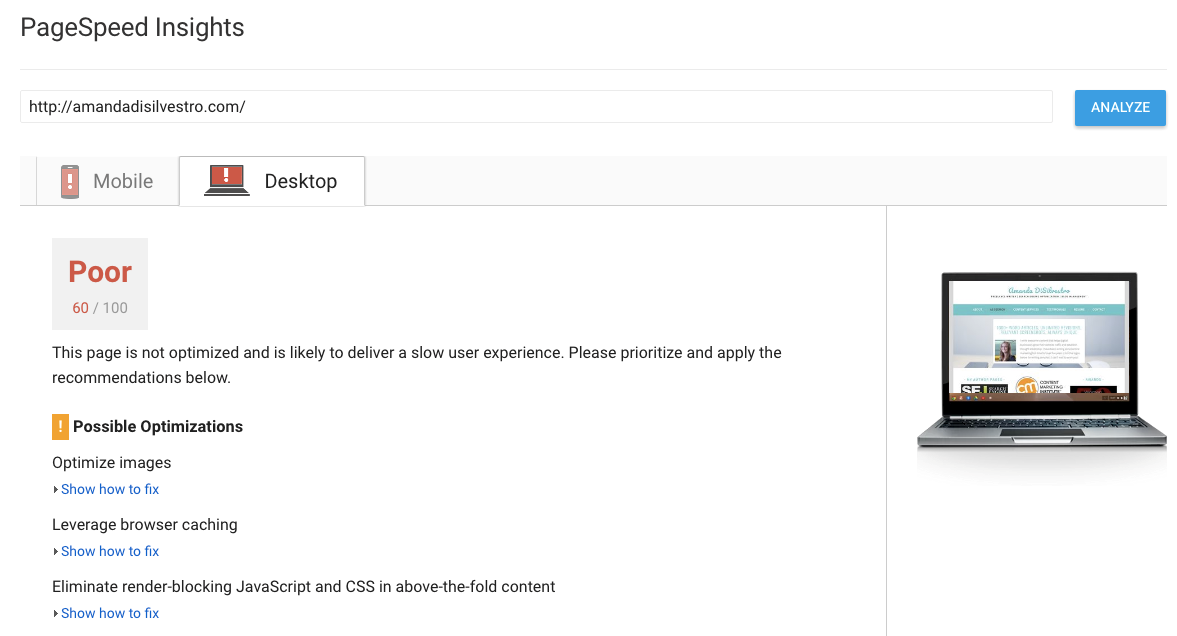
You can check the speed of your website with the PageSpeed Insights tool, shown below. This doesn’t necessarily mean your site needs a total redesign (a few things just may need to be improved), but it can be a contributing factor.

For more tips for getting a handle on your site speed, check out Ann Smarty’s comprehensive piece, ‘All you need to master your site speed without getting overwhelmed‘.

Technical errors

Notice that your bounce rate is all of a sudden super high? Take a look at how long users are on your page. If they’re only sticking around for a few seconds, you may have a 404 issue.

Take a look at your site from your visitors’ point of view (use different browsers, as this can also be the issue). You can also use Google’s Search Console to check the Crawl Errors.

Poor user experience (UX)

Have you ever been to a website with so many popups you couldn’t find the actual content? Google punishes those types of websites, and the average user won’t stick around if they can’t find the content they’re looking for.

This also contributes to difficult navigation, causing the user’s experience to drop significantly. Make sure that your website’s map is coherent and flows comfortably for the average user.

Mobile friendly websites

You’ve heard that more and more users are utilizing their mobile devices to access the Internet. In fact, nearly 60% of searches are carried out on mobile devices. Make sure that your website’s buttons are easy enough to access via a mobile device. Ensure that your landing pages are accessible via a mobile phone.

Google has an excellent free tool that allows you to test how well your website responds on devices like smartphones and tablets. Simply enter in your website’s landing page, and let the tool tell you how well it performs on mobile devices. The tool searches on a standard operating level (3G). For example, we did a sample search for Google’s website just to give you an idea of how it works.

The tool shows how many seconds (or heaven forbid minutes) it takes to load your website on a mobile device. It also shows you the estimated percentage of visitor loss you experience due to your loading time. You also have the option to pull up a free report that shows how you can fix any issues that affect mobile loading time.

For a more in-depth exploration of how to test for issues with your mobile site speed, don’t miss Andy Favell’s column, ‘How to optimize your mobile site speed: Testing for issues‘.

Outdated web design

Have you ever heard that by the time you purchase a brand new computer, it’s already outdated? The Internet works the exact same way. By the time you update your website, it’s already depreciating.

Remember the websites of the 90s? Blinking buttons, grayscale and neon colors, and lots of graphics? While many of those websites are still functioning, they’re not enticing the modern user to visit them. For example, take a look at www.ifindit.com.

First impressions mean everything, and this goes for websites as well. You not only lose credibility with poor web design, you lose visitors. Haven’t updated your website in a while? Here’s a quick primer on one of the most current trends in web design:

Modular design

Stemming from the simplicity of newer websites, modular design is becoming more popular. The basic principle behind modular design is to use a single, flexible template that can be adapted to different kinds of content, rather than a custom-made template tailored to each specific content type. It’s the design equivalent of the intelligent content trend in content marketing.

While modular design isn’t always appropriate for 100% of cases, in many of them it is more efficient, less resource-intensive and is an easy design for users to navigate.

Here’s an example of a modular website design by Waaark design studio:

The takeaway

Think of your website as a brick and mortar business. If the shingles are falling off and your windows are boarded up, no one’s going to stop in. Sometimes it takes a little revamping to get things going again. When you’ve spent time and money designing your website, parting with the old and accepting the new is difficult.

Chances are, you aren’t aware that your website needs fixing. If your website needs an upgrade, the signs are right in front of you. Take a look at your website’s analytics – are there issues that can be improved? Adapt to the changing times and get your website mobile friendly.

Most of all, don’t be afraid to think outside the box and try something new with your web design. Overhauling your website may sound daunting, but taking the plunge will be worth the risk.

Amanda DiSilvestro is a writer for NoRiskSEO, a full service SEO agency, and a contributor to SEW. You can connect with Amanda on Twitter and LinkedIn, or check out her services at amandadisilvestro.com.


from https://searchenginewatch.com/2017/07/26/how-to-tell-if-your-website-is-due-a-redesign/

source https://kateninablog.tumblr.com/post/163469864754

How to Use Social Listening to Create Viral Content

Viral content is inherently unpredictable.

You could have two similar pieces of content—with one receiving thousands upon thousands of shares and the other languishing in obscurity.

In that regard, there’s no magic formula that will enable you to create viral content on command.

It’s not like you can just flip a switch and get mass exposure.

It doesn’t work like that.

But there are several things you can do to increase the chances of your content going viral.

That’s what I want to talk about in this post.

More specifically, I’m going to explain how you can use social listening to your advantage.

Social listening, defined as “the process of monitoring digital conversations to understand what customers are saying about a brand and industry online,” is most commonly used for evaluating customer feedback and identifying their pain points.

But I’ve also found it to be absolutely perfect for predicting what my audience is craving and what’s most likely to go viral.

The way I see it, social listening is perhaps the best way to predict virality.

Here is how you can utilize it to your advantage.

Effectively analyzing content

There’s a popular expression:

the best predictor of future behavior is past behavior.

Although this can be debatable, depending on the context in which it’s used, you’ll want to follow this line of thinking in this instance.

Like I said earlier, you can never say with 100% certainty that a particular piece of content will go viral.

But what you can do is see what’s resonating the most with your audience at the moment.

If you notice that a particular topic, angle, theme, etc. is completely killing it, there’s a good chance you’ll see favorable results if you cover it as well.

But how do you know what’s popular and what’s resonating with your audience?

That’s where social listening comes in.

The key to effective social listening is knowing which tools to use.

I’m going to cover a few of my favorites you can use to discover trends and identify topics that have the potential to go viral.

Google Trends

Let’s start from the top.

I use Google Trends quite frequently for market research and for gauging people’s interest in various topics.

But I find it can also be helpful for identifying the hottest topics at any given moment.

For starters, you can simply go to the Google Trends homepage.

hdxdJcohQfy7wQb6lLOTeQ

Start scrolling down to see the top trending stories:

hg2259JLSpWZawbXFotNXw

Sometimes, this can give you some potential ideas to work with.

Of course, the trending stories aren’t narrowed down by niche or topic, so you’re dealing with a wide variety of subject matter.

But sometimes that’s all it takes.

If you see something that interests you, click on it:

XtICn3zVRdiM3SAN0b2YPg

You’ll then get some of the most relevant articles, which should provide further clarification on what’s popular at the moment:

RdRpyOj4TWa44sbdMCfSGw

In this case, a lot of people are talking about Snapchat’s new “Snap Map” feature.

Therefore, this could be something I would want to investigate further and a potential topic I could cover.

Using Top Charts

Another useful feature is called “Top Charts.”

From the Google Trends homepage, click here:

trzuK72MRIC4kBbR5r0qqw

Then click on “Top Charts:”

LNEuhUJLR6SpLVTbbiyc7A

Here’s what you’ll see:

RNi XPGRQf6Rp i9IhOQqg

Scroll down to look at all the different categories.

Or you can search for a relevant category by clicking on “All Categories” and choosing the one you’re looking for:

n4x8UO2gQbOXUea0ulwejg

cME9Xx3KT52iyTHcDjW8vQ

Once you’ve found your category, you can click on “More” for more detailed information:

t5zxlStDTneo3u TWA WA

43pFyzD2R8yED9mq5DwOwg

The logic here is that you can use up-to-date data from Google to see what people are most interested in at the moment in your industry/niche.

Google Trends is by no means a be-all and end-all social listening tool, but it can serve as a nice starting point.

Inbound.org

This is only applicable to digital marketers like myself.

But if this is your area of focus, it can be a potential gold mine.

Here’s what you want to do.

Once you’re at the Inbound.org homepage, scroll all the way down to the bottom.

You’ll see this:

4z0RzcLATJC9fILu5pBl6A

Click on whatever sub-category you’re interested in.

I’ll go with SEO:

iW0 SJ2tQnGXFpaHaV9tmA

Here’s what I get:

fEznfgRSmWbbrNbtRZ3oQ

Scroll through the list, looking for ideas.

Inbound.org does most of the heavy lifting for you by curating the top stories.

Many have received a high volume of shares, so you know the interest it there.

Also note once you sign up, you can create your own feed to streamline the process even more.

This way the stories come right to you.

BuzzSumo

Now, let’s bring out the big guns.

BuzzSumo is a beast when it comes to finding out how much engagement content receives.

And since engagement (shares in particular) is the ultimate indicator of virality, this is one of the best ways to capitalize on trends and increase your odds of creating viral content.

Here’s what you want to do.

Type in a keyword you’re looking to base your content on in the search box of your dashboard.

I’ll use “SEO” as an example:

ucBSIcqYTLWKn Iy31SEpQ

Now, set your filter date to a time that sounds right to you.

Because we want to capitalize on current trends, I recommend going back no further than six months.

However, the past month or week is ideal.

You can even set it to the last 24 hours, but you’ll usually have limited data.

I’ll set mine to the past week:

n2 OEVieQTy2FtcO9or2fw

Once you do that, BuzzSumo will populate your screen with the top content according to total shares.

Here are the top results I got:

p7WM0 6RHeR7oep0U9xIw

Now all I have to do is browse through the content and look for two things:

  1. content that’s relevant to my industry/niche
  2. content that’s received a significant number of total shares and/or links.

This post from Search Engine Land about testing accelerated mobile pages (AMP) for WordPress caught my attention:

iAGLv4D R2 SO pjdPacCw

Not only did it get 1.5k shares in the past week, it also got 41 backlinks.

This lets me know that my audience is obviously interested in this topic.

And if I created an article that was bigger, better and more epic, it would have a reasonable likelihood of going viral.

This is the formula you want to use with BuzzSumo.

It doesn’t matter what topic you’re covering.

Following these steps will let you know what people are responding to and give you very specific data to base your decisions on.

Let me say that the Pro version is ideal because it gives you a lot more data.

That’s what I used for this example.

However, you can do a limited search with the free version, which can still be useful.

Other tools

So far I’ve provided you with three different resources for social listening.

But that’s just the tip of the iceberg.

There are several other tools you can experiment with, many of which are free.

Check out this list of the top 15 free social media monitoring tools from Brandwatch for info on other tools.

Taking what you’ve learned and running with it

At this point, you should have a pretty good idea of which topics are popular at the moment and what your audience is responding to.

That means you’re not basing your content on a hunch. You’re basing it on tangible data.

Your job now is to create the best content possible around that topic.

Now, I’m not saying you should blatantly rip someone off.

What you want to do is put your own spin on things.

Look for a way to expand on it.

And, of course, it needs to be awesome.

It needs to be epic.

Just think skyscraper technique.

Hitting the mark in terms of quality and value is absolutely essential if you expect for your content to go viral.

I’ve already covered this extensively in the past, so there’s no need to talk about it here.

But let me point you to a couple of articles I’ve written that should be helpful.

There’s this one from NeilPatel.com.

It’s a guide for writing epic content that will go viral.

And there’s this one from Quick Sprout, which is about the anatomy of virality.

Conclusion

Social listening is useful for many different aspects of marketing.

Using it to gauge your audience’s collective reaction to various topics will give you a good idea of what type of subject matter is most likely to go viral.

This gives you valuable knowledge to guide your content creation.

In turn, you can “scratch your audience’s itch” and give them what they’re looking for.

And just think of the competitive advantage this gives you over other brands that simply slap up content at random without giving it any real thought.

While there are never any guarantees that something will go viral, following this formula increases the chances significantly.

What do you think is the main contributing factor for content going viral?


from http://feedproxy.google.com/~r/Quicksprout/~3/M8u4smWGlr8/

source https://kateninablog.tumblr.com/post/163452670174