Friday, 29 December 2017

How to Take and Edit Photos Without Hiring a Professional

No matter what type of business you have, you need to be using high quality images as a promotional tool.

You can distribute these pictures across all your marketing channels.

Share them on social media profiles such as Facebook, Instagram, and Twitter.

Add photos to your website to make it look more professional.

You can even send images to subscribers on your email marketing lists to make your messages more visually appealing.

Incorporate photos into your blog posts to break up the content and make it easier for people to read.

I like to use visuals in my blogs to illustrate what I’m talking about.

High quality images can add credibility to your website.

While there’s nothing wrong with using images you find online, nothing speaks to the customer like original photographs.

Taking your own photos means they are unique. Someone won’t be able to say,

“Oh, I’ve seen this picture somewhere else before.”

Ultimately, putting the perfect picture in the right place can help you generate more traffic and leads, which was identified as the top challenge for marketers in 2017.

image2 6

Here’s the problem, however. Professional photographers are not cheap.

Your company has enough expenses to worry about, so you shouldn’t be paying for a service you can do yourself.

The other problem I see is original images often look terrible.

That’s no good either. You don’t want any low quality images to be associated with your brand.

It looks unprofessional and will result in a negative perception by your current and prospective customers.

If you fall into one of the above categories, I can help.

I’ll show you the right tools to take and edit photos without spending much or needing to hire a pro.

Get the right equipment

You don’t need to spend thousands of dollars on camera equipment.

But you shouldn’t be taking pictures on one of those cheap disposable cameras either.

Find a middle ground.

A sufficient camera might just be in your pocket right now.

Currently, 77% of adults in the United States own a smartphone.

image1 6

As a business owner or marketing expert, you probably have a smartphone.

The cameras on the majority devices are fairly decent.

If you’re in the market for a new phone, it makes sense to get one with a great camera.

There are tons of online review websites, such as Tom’s Guide, that give you detailed information about various devices depending on what you’re looking for.

Here are some of the best devices in 2017 for different categories reviewed by their experts:

  • Best overall smartphone camera – iPhone X
  • Best features on a camera – Galaxy Note 8
  • Best camera for landscape photos – LG G6
  • Best camera for selfies and low-light images – Samsung Galaxy S8
  • Smartest phone camera – Pixel 2 XL
  • Best smartphone camera for videos – LG V30

These are good places to start looking.

But do some research on your own before making your purchase.

You may even own one of these devices already.

If you’d rather use a camera than a cell phone to take pictures, that’s fine too.

Here’s a comparison of some cameras ideal for beginner photographers:

image6 6

As you can see, the prices range from about $400 to $800, which is reasonable.

Professional photographers may be charging you more than that for a day’s work.

Brush up on some basic photography skills

Now that you’ve got a proper camera to take pictures with, you need to master some simple photography concepts.

Learn how to use the various tools and picture modes on your device.

For example, let’s say you’re using an iPhone to take pictures.

You’ll notice an option called “HDR Mode.”

HDR stands for high dynamic range. Here’s how you turn it on:

image4 6

When should you use it? For every picture?

The HDR mode works best for outdoor photographs and landscapes.

That’s because both of these usually have some bright as well as dark areas. Without the HDR mode, some details can get lost between the light and dark contrasts.

But it takes your camera longer to process HDR photos.

If you’re trying to take images in a rapid succession or photograph a moving object, you’ll want to keep the HDR mode off.

You also need to consider where you plan to take photos.

Conditions—whether inside, outdoors, in the sun, or in the dark—will dictate how you take them.

For example, it’s tough to capture an image if the sun is directly behind the subject.

Unless you have a professional camera, the picture will come out either super bright or too dark, depending on what you’re focusing on.

You also need to learn when it’s appropriate to use the flash on your camera.

The composition is important as well.

You need to understand how the subject should appear in your photo.

One of the most common photography concepts of composition is the rule of thirds:

image7 6

Imagine your camera frame is broken up into nine sections of equal sizes.

Some cameras have these horizontal and vertical guides to help with your composition.

You want to position your subject where those lines meet.

The example above has the subject positioned in the left third of the screen.

But let’s say you’re taking a picture of a landscape instead of a person or object.

In this case, you’ll want to align the horizon with the upper or lower third of the frame as opposed to the left or the right, like in this example:

image3 6

As you can see, this makes for a much more appealing picture.

Another basic photography tip is natural framing.

Let’s say you’re taking a picture of a building that has pillars or columns.

It makes more sense to position your subject between two pillars as opposed to in front of one.

Here’s an example of a bridge creating a natural frame:

image11 2

If you see the opportunity to capture a natural frame when you’re taking pictures, use it.

In the above example, pretend that the top of the image was cut off. It wouldn’t look as natural. But including the entire frame makes it appear more professional.

Something else you need to consider when you’re taking pictures is what you’re focusing on.

If you are photographing a person or specific subject, it’s imperative they are in focus.

Sometimes it’s a cool effect to have part of your photo in focus but the background blurry.

Photographs that have symmetry and patterns are visually appealing and professional-looking as well.

Check out this photo of the Taj Mahal:

image12

All the elements are symmetrical, and the building is still positioned in the top third of the picture, so it follows all the rules.

There are tons of other photography rules you can follow to make sure you’re taking great pictures, but following these is a good to place to start.

You can do some more research about photography basics or even take a class. Both of these options are considerably less expensive than hiring a professional.

Plus, it’s always beneficial to learn a new skill applicable to your business.

Use Canva

Once you’ve taken the pictures, you’ll need to edit them to minimize any imperfections, making them look as professional as possible.

Canva is an image editing tool. It’s one of the best options you’ll find online.

You can edit pictures directly on their website or download a mobile version of their software for your iPhone or iPad.

I like to use Canva because it’s super diverse.

You’re able to access many different features all in one place.

Canva has multiple templates for your images, depending on where you want to distribute them.

For example, do you promote your company with paid advertisements on social media or other mediums such as Google AdWords?

Canva ensures your image is sized appropriately depending on the type of advertisement you’re running.

image5 6

If you attempt to do this on your own, the image could be distorted, blurry, or even illegible. So it’s best to use professional editing software for this.

One of the best parts of Canva is it’s free.

You may encounter a couple of features that cost a few bucks to access, but you can do all your basic edits without having to pay for anything.

For those of you who want access to everything on the Canva platform, I’d recommend upgrading to their Canva for Work package.

It’s only $12.95 per month, and you can save over 20% if you pay for the full year upfront.

You can try it free for 30 days to see if it’s worth it.

Again, this is way more cost effective than hiring a professional photographer to edit your pictures.

Try PicMonkey

PicMonkey is another one of my favorite editing tools.

It’s really easy to use, and uploading your photos is a breeze.

They also have a mobile app in the Apple App Store and Google Play Store, so it’s perfect for both Apple and Android users.

If you’re taking pictures on your smartphone, it’s easy to edit them directly from your device without having to upload them to a computer.

PicMonkey has great photography tutorials.

They cover some of the basic concepts I discussed earlier and teach you how to use different functions of their software.

But overall, I think it’s pretty easy to use.

image10 3

These are the top features of PicMonkey:

  • editing tools
  • touch ups
  • collages
  • designs

It’s pretty much everything you could need to edit the photos you took on your own.

The collage tool is perfect for showcasing different products or features on your website.

You can create one simple image with a combination of the photos you took.

Here’s an example of a really cool collage on the Square website:

image8 5

You can create something similar for your business with PicMonkey.

Create infographics with Piktochart

Sometimes you don’t need to take a photograph to have an original image on your website.

Build an infographic.

It’s a great way to increase engagement on your website or blog.

In fact, people are 30 times more likely to read an infographic as opposed to plain text.

Infographics can also increase traffic to your website by 12%.

Visual content gets liked and shared on social media three times more than other types of content.

The Piktochart website has all the tools you need to create customized infographics.

image9 4

You can even use your own pictures as background images.

Find other ways to incorporate those original photos into your infographic so you’re not forced to use those cartoonish designs if that’s not your style.

They have a free membership for basic features.

You can also upgrade to a $15 per month or $29 per month plan with extra features.

But try the free version first to make sure you’re happy with it.

Conclusion

Unique photos can give your website, blog, emails, and social media pages the final touches that appeal to your customers.

You don’t need to hire a professional photographer to take and edit your photos.

That’s a waste of money.

You can do all of this on your own without spending much at all. It’s easy.

Just make sure you have the right equipment.

Get a smartphone that has a great camera. Or you can start off with an actual camera designed for amateur photographers.

Next, familiarize yourself with some basic concepts of photography.

Refer back to the points I outlined earlier as a guide for composition:

  • rule of thirds
  • natural frames
  • symmetry
  • focus

Once you’ve taken pictures, you can use editing tools on your computer, smartphone, or tablet to touch them up and make them look more professional.

Use tools such as Canva, PicMonkey, or Piktochart to get started.

Follow these tips, and you’ll be snapping and editing photos like a pro in no time.

What are some other tools you use to edit your photos like a professional?


from http://feedproxy.google.com/~r/Quicksprout/~3/W2r0mNUO6JU/

source https://kateninablog.tumblr.com/post/169091510479

Best of 2017: Our top 5 search industry articles

As we come to the end of 2017, we’ve decided to take a look back at some of our most-read articles throughout the year. For the rest of this week, we’ll be highlighting the top five most popular articles in various categories across the site.

So far this week, we’ve rounded up our top five articles on SEO and top five articles on PPC. To wrap up the week, we’re taking a look at our top five most-read articles about the search industry.

Our Industry category on Search Engine Watch covers any developments in the wider search industry, such as new search engines, the evolution of Web 3.0, or major changes to search engines like Google, Bing, Yahoo, etc. It also covers articles about strategy and how marketers should approach SEO, PPC and SEM in their day-to-day jobs: such as how to get execs excited about SEO, or how much SEO should really cost.

To the surprise of no-one, our most popular articles in this category tend to be things that Google is doing. So here is our very Google-centric list of the top 5 most popular Industry articles published in 2017.

#1: The 10 best Google Doodles of all time

Who doesn’t love a good Google Doodle? The creative and inventive Google Doodle, which we’re now accustomed to seeing on the Google homepage with regularity, actually began life in 1998 as a quirky out-of-office message to notify users that Sergey Brin and Larry Page, co-founders of Google, had gone to Burning Man festival.

Soon afterwards, Google began experimenting with Doodles to mark historical events, and the Doodle’s popularity was so great that it has become a regular fixture on Google’s homepage, with a dedicated team of around 10 staff members.

In our most-read Industry article of 2017, Clark Boyd looks back over nearly 20 years of Google Doodles to pick the 10 best Doodles of all time.

The 10 best Google Doodles of all time

#2: Google just released verified customer reviews: 3 ways to come out on top

Customer reviews are important for SEO and brand reputation, particularly in the new age of linkless link-building. But they aren’t always reliable. As such, Google’s introduction of Verified Customer Reviews, a method of leaving feedback in which you can guarantee that the reviewer is a genuine customer – was a big development.

Amanda DiSilvestro looked at how business owners can sign up for verified customer reviews, as well as three ways to make sure you come out on top.

Google just released verified customer reviews: 3 ways to come out on top

#3: A visual history of Google SERPS: 1996-2017

Over the past 20 years, Google has revolutionized how we source information, how we buy products, and how advertisers sell those products to us. And yet, one fact remains stubbornly true: the shop-front for brands on Google is still the Search Engine Results Page (SERP).

Since Google began as a college project named Backrub in 1996, those “ten blue links” which make up the Google SERP have undergone all kinds of evolutions, from the advent of local results in 2004 to the introduction of Google Suggest in 2008, to the more recent removal of the right-hand rail of search ads in 2016.

It can be easy to lose sight of just how much the SERPS have changed as a whole, over the years. This brilliant infographic by Clark Boyd, Safiya Lawrence and Chelsea Herbert looks back over how far Google has come, and considers the trends that predominantly define the SERPs today.

A visual history of Google SERPs: 1996 to 2017

#4: What do we know so far about Google’s new homepage?

And speaking of changes to Google… Without a doubt, the biggest change to come to the internet’s most popular search engine this year has been the launch of its new, feed-based mobile homepage in July.

Perhaps the most drastic update of the Google.com homepage since Google’s creation in 1996, the new homepage allows users to customize a news feed that updates based on their interests, location, and past search behaviors.

On the heels of the new homepage’s US launch, Clark Boyd looked at what we knew so far about the homepage, why Google chose to launch it when they did, and the potential new opportunities for marketers.

What do we know so far about Google’s new homepage?

#5: Google Chrome SSL certificate proposal could affect millions of websites

In another major piece of news this year, potential millions of websites that use SSL certificates issued by Symantec and affiliated resellers faced finding out that their certificates were effectively worthless as far as Google Chrome was concerned, after a member of the Chrome team published a proposal that would make them untrusted over the next 12 months.

According to the Google Chrome team, Symantec had not properly validated thousands of certificates. In fact, the Chrome team claimed that “an initial set of reportedly 127 [misissued] certificates has expanded to include at least 30,000 [misissued] certificates, issued over a period spanning several years.”

Al Roberts looked at the news for Search Engine Watch and its potential impact for website owners

Google Chrome SSL certificate proposal could affect millions of websites

And that’s it for us in 2017! We hope you enjoy revisiting the best of our published content over the past 12 months, and we’ll see you in the new year!


from https://searchenginewatch.com/2017/12/29/best-of-2017-our-top-5-search-industry-articles/

source https://kateninablog.tumblr.com/post/169078867199

Thursday, 28 December 2017

Best of 2017: Our top 5 articles in PPC

As we come to the end of 2017, we’ve decided to take a look back at some of our most-read articles throughout the year. For the rest of this week, we’ll be highlighting the top five most popular articles in various categories across the site.

Yesterday, we kicked things off with a look at our top 5 articles about SEO, and if you missed that one, it’s definitely worth a read. Today, we’ll be turning our attention to the other great staple of Search Engine Watch content: PPC.

We covered some fun ground with our PPC articles this year, from emoji in AdWords ad titles to the psychology of ad copy, to the impact of Google’s new ‘Ad’ label on marketers. Let’s not waste any more time – here are our top 5 articles from 2017 about PPC.

#1: Emoji appear in Google AdWords ad titles

This was an interesting one. Just a couple of weeks after we wrote about Google’s decision to bring emoji back to the SERPs, emoji were spotted in the wild in AdWords ad titles, suggesting that Google had decided to go the whole hog in embracing emoji in both organic search and paid search ads.

Sadly, the test doesn’t seem to have lasted in the case of paid search, as Google’s official stance is still that emoji are “invalid characters” – but there have also been recent reports of people being able to bid on emoji in AdWords. Either way, the combination of fun emoji news with a potential big change for search marketers makes it no surprise that this was our most-read article about PPC in 2017.

Emoji appear in Google AdWords ads titles

#2: The psychology of language for paid search

When it comes to PPC best practice, there’s a vast amount of ground you can cover, from keyword bidding to demographic targeting, AdWords reports, landing page optimization and everything in between. But how often do we talk about the actual copy of the ads that are supposed to get consumers’ attention?

According to Sophie Turton, Head of Content and PR at Bozboz, people don’t buy what you do; they buy why you do it. In her presentation at Brighton SEO in April 2017, she explained how search marketers can use psychology to make their paid search ads more effective. Tereza Litsa sums up the key highlights in an informative piece for Search Engine Watch.

The psychology of language for paid search

#3: 10 online marketing strategies to make you a unicorn [infographic]

It’s hard to go wrong with a good infographic, and Larry Kim of Wordstream has a great one which brings together 10 online marketing strategies to make you a unicorn – one of those magical campaigns that’s so effective, it performs in the top 1-3% of all marketing campaigns.

Sound like a dream come true? Check out Larry’s infographic, whose points he expands on in further detail in his post, and find out why you need to forget everything you know about Conversion Rate Optimization.

10 online marketing strategies to make you a unicorn [infographic]

#4: How to target high-income consumers with AdWords

There are many industries in which being able to target high net worth individuals with your paid search campaigns is extremely useful. If you think that AdWords doesn’t have this function, you might want to think again.

Wesley Parker reveals the secret behind a “deeply hidden gem within AdWords”, currently available for U.S. locations only, which allows you to target people based on their household income. With step-by-step instructions and screenshots, he explains exactly how to set this up, as well as how you can use layered targeting to pull in multiple different demographics.

How to target high-income consumers with AdWords

#5: How will Google’s new ‘Ad’ label impact marketers?

In a major development for PPC, Google began testing a new look for its ad labels in January of this year, and in late February confirmed that this would be rolled out globally.

The new white label with green text and a green outline replaced the green label that was launched in June 2016, and blends much more seamlessly with the rest of the ad placement, perhaps creating less of a contrast between organic and paid search results. Clark Boyd considered Google’s motivation for the change, and the possible impact on search marketers.

How will Google’s new ‘Ad’ label impact marketers?


from https://searchenginewatch.com/2017/12/28/best-of-2017-our-top-5-articles-in-ppc/

source https://kateninablog.tumblr.com/post/169038517654

Wednesday, 27 December 2017

Best of 2017: Our top 5 articles in SEO

As we come to the end of 2017, we’ve decided to take a look back at some of our most-read articles throughout the year. For the rest of this week, we’ll be highlighting the top five most popular articles in various categories across the site.

First up is, of course, the bread and butter of Search Engine Watch: SEO. Several of our most-read articles in SEO were list articles (hard to go wrong with a good list), and they often dealt with how to prepare for the year ahead: how to plan your strategy for 2017, tips to boost your SEO in 2017, trends to watch in 2018.

If you missed any of these excellent articles when they were published, now’s your chance to check them out. And if you’ve already read them, well, it never hurts to refresh your knowledge.

#1: Five quick tips to boost your SEO in 2017

Everyone loves quick tips for SEO, and Tereza Litsa has some great ones to get your SEO off to a strong start in the new year. These might be tips for 2017, but they stand the test of time – there’s no reason why you shouldn’t apply these to your SEO going into 2018, if you haven’t already.

Five quick tips to boost your SEO in 2017

#2: Seven SEO trends to watch in 2018

What does the year ahead hold for SEO? While it’s hard to say exactly what will unfold in 2018, based on the events of this year and the prevailing winds in the industry, we can make a pretty good guess as to what the major trends will be. Tereza Litsa outlines seven you need to watch and account for in your search strategy next year.

Seven SEO trends to watch in 2018

After you’ve clued up on the trends ahead, don’t miss our follow-up article on how to optimize for them: How to future-proof your SEO for 2018.

#3: The 15 best Google Chrome extensions for SEO

Google Chrome dominates as the world’s favorite desktop browser, and its thousands of extensions give it an almost daunting level of customization. You can do just about anything with Google Chrome extensions, including – no, especially – SEO. But which are the best extensions to use?

Clark Boyd rounds up 15 Chrome extensions to aid you in your SEO efforts, from a quick site review to on-site content analysis, technical SEO and backlink analysis.

The 15 best Google Chrome extensions for SEO

#4: Building your SEO strategy in 2017: What’s most important?

In another enduring piece about SEO strategy for 2017, Marcela de Vivo looks at the areas you should be focusing on for SEO amid hundreds of possible ranking factors and points of optimization. Again, it’s still highly relevant as we come to the end of the year and well worth a revisit. How many of these areas did you nail in 2017?

Building your SEO strategy in 2017: what’s most important?

#5: How to create SEO-friendly content

The increasing merging of content and SEO, once thought of as separate disciplines, has been one of the enduring themes of the past couple of years. By now, if your content strategy and SEO aren’t at least on the same page, if not working hand-in-glove, then you’re definitely taking the wrong approach to both.

If you need a primer or a refresher on creating the best content to rank well in search, Tereza Litsa has you covered with her guide on how to create SEO-friendly content.

How to create SEO-friendly content

Check back tomorrow for our next set of highlights – the top 5 most popular articles in PPC.


from https://searchenginewatch.com/2017/12/27/best-of-2017-our-top-5-articles-in-seo/

source https://kateninablog.tumblr.com/post/169020241724

The Top 9 Marketing Trends to Look for in 2018

The most successful marketers have one thing in common.

They find a way to gain an edge over their competitors.

Marketers who can analyze the trends and prepare for the future have the best chances of setting their companies up for success.

You don’t want to be the last one to jump on the bandwagon.

As we head into 2018, I’ve taken the time to identify the top marketing trends for the year.

I want to share my insights with you so that you can apply these concepts to your business and start the new year on the right track.

Properly applying these trends to your marketing strategy will improve customer engagement.

You’ll also be able to acquire more customers this year.

Let’s dive right in. These are the top 9 marketing trends for 2018.

1. Live video streaming

Social media platforms paved the way for the live video trend.

Instead of using social media for posting pictures and videos, you now have the ability to stream live content.

Take a look at how marketing experts are expecting live video to rise over the next two years:

image3 7

If you weren’t using live video to interact with your customers in 2017, it needs to be a priority for you in 2018.

Studies suggest 80% of consumers prefer watching a live video from a brand as opposed to reading a blog.

And 67% of people are more likely to purchase a ticket to events like a concert after watching a live stream of a similar event.

Some of the most popular live video platforms include:

  • Facebook live
  • YouTube live
  • Instagram live
  • Twitter
  • Periscope

I like it when businesses use live videos because it gives them a chance to interact with their audience directly.

You’ll be able to communicate and get feedback from customers in real time.

Plus, it’s not like your live video is gone forever once you stop streaming.

You can save those videos and repurpose that content in the future.

2. Artificial intelligence (AI)

Artificial intelligence will continue to rise in 2018.

If you’ve been to any marketing conferences or events in the last year or so, you’ve probably seen at least one session on AI.

AI tools are used to analyze consumer behavior.

Once the behavior is analyzed, these robots can make decisions according to how they are programmed.

AI robots can start to take over some basic human roles, which will allow your team to spend more time on assignments that require actual human insight.

An example of AI you may be familiar with is a chatbot.

These computer programs can have conversations with your customers.

I’m sure you’ve been on a website where a “customer service representative” popped up to start an instant message conversation with you.

That’s an example of a chatbot.

With artificial intelligence on the rise, marketing executives feel unprepared for this trend.

image1 7

Now is the perfect time for you to educate yourself on the use of AI to improve different areas of your business.

It will give you an edge over your competitors who aren’t prepared.

3. Micro influencers

I’m sure you’re familiar with brand ambassadors and social influencers.

These are people on social media who have relationships with companies and get paid to promote products on their personal profiles.

It’s a legitimate marketing strategy.

When it comes to social influencing, to be considered a celebrity, one has to have over 1 million followers.

People with 500k–1 million followers and 100k–500k followers fall into the macro influencer and middle influencer categories, respectively.

Micro influencers have between 1k–100k followers on social media.

Brands are reaching out to these micro influencers because it’s easier for people to relate to them.

Let’s be honest.

Not many people can connect with celebrities. Plus, it’s obvious when they’re promoting something on their profiles.

You may even have doubts that those celebrities use the products they’re pitching.

But it’s much easier for the average person to relate to a micro influencer.

Why?

Well, for the most part, these people aren’t actually famous. They have normal jobs and live regular lives. But they happen to be popular on social media.

Take a look at how micro influencers are perceived by consumers:

image4 7

In this case, less is more.

Notice the difference in user engagement between influencers with 1k to 4k followers and influencers with over 100k followers.

Consider finding some micro influencers to represent your company on social media.

Another benefit of this strategy is the cost.

If you want to partner with a celebrity like Beyoncé, it’ll cost you $1 million per post.

That’s absolutely outrageous.

But a micro influencer will likely cost you only $250 – $500 per post.

Plus, you can also send them some free stuff to keep them happy.

4. Content marketing

If you’ve had any marketing success over the past few years, I’m sure you’ve used content marketing strategies.

Well, 2018 isn’t the year to take your foot off the gas pedal just yet.

Content marketing is still trending upward.

Compared to other factors, content marketing will have the biggest impact on companies in 2018, according to business executives:

image6 7

Rather than coming up with new content marketing strategies, refine your existing ones.

Make sure your content is relevant and has a clearly defined audience.

Content marketing is great because it’s typically not expensive.

You’ll also see more sales and an increase in customer loyalty when you properly execute these strategies.

Don’t think you need to focus all your energy on new trends, like artificial intelligence in 2018.

Continue your content marketing efforts.

5. Generation Z

It seems over the past several years, companies have been focusing on Millennials.

There’s nothing wrong with that.

It’s important to target consumers while they are young so you can try to retain them for as long as possible.

Every generation has different buying habits.

Millennials have helped shape the marketing trends over the last decade or so.

But now it’s time to put some more emphasis on younger generations as well.

Generation Z, also known as the iGeneration, Post-Millenials, or the Homeland Generation are people who were born in the late 1990s to mid-2000s.

The oldest people in this generation are entering their early 20s.

As they get ready to graduate from college, they’ll enter the workforce, which means their consumption habits will change.

A steady job means they will have more buying power.

Companies need to do more research on this generation and find out how to target them.

It doesn’t matter what industry your company is in.

Start to shift your focus toward Generation Z in 2018.

I’m not saying you should abandon your approach with Millennials or Generation X, but just recognize there is a fresh market for you to target.

Find out how they spend their free time. For example, look at how active Generation Z is in sports compared to the general population:

image2 7

Even if your company doesn’t make sporting equipment, you can still use this data for your marketing strategy.

You can focus your Generation Z marketing campaigns around physical activity or athleticism.

That’s just one example.

Do your research, and find out what Generation Z wants and how they consume information.

That’s the key to acquiring these consumers.

6. Consumer personalization

You need to give your customers a personalized shopping experience.

That’s one of the best ways to increase engagement and sales.

It’s what your customers want.

In fact, 75% of consumers prefer retailers that use personalization to improve their shopping experience.

image8 6

Encourage people to create a customer profile on your website or mobile application.

That way, you can monitor their habits and give them special offers based on their browsing pattern or previous purchases.

This is absolutely essential for companies who have an ecommerce website.

Personalization tactics make it easier for you to upsell and cross-sell to your customers.

Ultimately, this means you’ll make more money without spending much.

It’s cheaper to target your current customers than it is to acquire new ones.

You can also send personalized email messages to your subscribers.

Email personalization can improve your conversion rates by 10% and increase click-through rates by 14%.

If you personalize the subject line of an email, there is a 26% greater chance of the recipient opening it than if you don’t.

Numbers like this are too good to ignore.

Those of you who weren’t using personalization in 2017 need to start doing so in 2018.

7. Privacy protection is more important than ever

People are worried about their privacy.

Marketers need to start using privacy protection as a selling point.

Let your customers know how you are protecting their information.

Over 143 million Americans were affected by the Equifax breach in 2017.

That’s scary.

It’s especially scary since the company is a consumer credit reporting agency.

If your information isn’t safe with them, where is it safe?

This event has consumers on high alert moving into 2018.

They may be hesitant to do things like entering their credit card information online fearing they could become victims of credit card fraud.

How can you make consumers feel safe?

There are certain things you can do to add credibility to your website.

  • display all your security badges
  • provide up to date contact information
  • add customer reviews and testimonials
  • make it easy to navigate
  • have fast-loading pages
  • make sure your checkout process is secure

All of this will make customers feel safe when they’re shopping.

If your company appears sketchy or untrustworthy online, it’ll be difficult for you to get lots of sales.

8. LinkedIn will continue to lead the way for B2B marketers

While B2C companies will have better luck using social media platforms and email marketing tactics to connect with their clients, B2B marketers have to focus on their LinkedIn presence.

image7 7

Look at these numbers.

Over 90% of B2B marketers say LinkedIn is the most effective platform for lead generation.

If you’re in the market for new customers, LinkedIn should be the first place to look in 2018.

Connecting with a potential client on LinkedIn increases the chances of them buying from you by 50%.

I expect these trends to continue in 2018.

Beef up your LinkedIn presence if your company operates on a B2B revenue model.

9. Interactivity

In 2018, your company needs to focus on interactivity, especially when it comes to email marketing.

Contrary to popular belief, email marketing is far from dead.

But you can’t just keep sending out the same boring emails over and over again and expect to get different results.

Interactive emails improve engagement with your subscribers.

In 2017, interactivity was a top email marketing trend.

image5 7

But that wasn’t a fad.

This trend will continue through 2018 as well.

Here are some of the best ways to incorporate interactivity into your email marketing campaigns:

  • use real-time marketing
  • add surveys, polls, and reviews
  • include videos
  • add menus for easy navigation
  • use GIFs instead of pictures
  • add live shopping carts

If you saw success with interactivity tactics in 2017, continue to use them in the new year.

And if you haven’t tried them yet, it’s not too late to jump on board in 2018.

Conclusion

Staying up to date with the latest marketing trends is a recipe for success.

The best marketers look toward the future to predict consumer behavior.

If you can identify trends and make applicable changes to your marketing strategy, it will give you an edge over your competition.

After extensive research, I came to the conclusion the above trends will have a major impact on the success of your brand in 2018.

If you’re struggling to come up with new ideas, start with the topics I’ve outlined in this post.

What marketing trends has your business identified, analyzed, and implemented for 2018?


from http://feedproxy.google.com/~r/Quicksprout/~3/38JYt2TO7-E/

source https://kateninablog.tumblr.com/post/169010275049

Friday, 22 December 2017

How to Increase Sales by Mastering the Art of Storytelling

Nothing keeps someone on the edge of their seat like a good story.

That’s why people love to watch movies, read books, and binge-watch television shows.

I know we all have that one friend or family member who tells the best stories around the dinner table.

But what if there was a way to turn those stories into dollars?

There is.

You’ll be able to boost your sales if you can get customers to connect with your stories.

Some of you may be thinking, “I’m a terrible storyteller, so this won’t work for me.”

And some of you might say, “My life is boring. I don’t have any good stories to tell.”

Yes, storytelling is an art.

Not everyone is born with the ability to tell an engaging story.

But luckily for you, I’m very familiar with storytelling.

In fact, I use this strategy all the time as a marketing technique.

If you’ve been reading my blog for a while, you may remember this article I wrote a couple of years ago where I shared my personal experience:

image5 3

That blog post has nearly 70 comments on it.

People buy food, but nobody seems to think you can make money off it.

Plus, with numbers so high, readers are bound to be interested.

I’ll share with you some of my storytelling secrets that you can implement in your marketing campaigns to squeeze revenue from your customers.

Here’s how you can master the art of storytelling.

Identify the target audience of your story

First, recognize to whom you’re telling the story.

Make sure it’s appropriate for that audience.

Let’s use an analogy before we relate it to your business.

A story you might tell to your poker buddies during a card night while having a beer may not be something you’d tell your in-laws during a Thanksgiving dinner.

You know what I mean?

For the most part, I’d recommend keeping your stories suitable to all ages.

I practice what I preach. If you read my blogs, you typically won’t see any vulgarity or cuss words.

But depending on your brand and how you market yourself, it may be part of your image.

Something else to consider is where you plan to distribute your story.

If you’re posting it on social media, your audience may vary depending on the platform.

image1 3

Let’s say you identify your target audience as baby boomers.

Based on the graph above, it wouldn’t be smart to tell that story on Instagram, Snapchat, or Twitter because there isn’t an active presence of your audience.

But if you were trying to connect with millennials, Instagram or Snapchat would be good channels to promote your story.

Once you figure out the target, you’ll be able to use an appropriate tone to tell the story and release it on the right platforms as well.

What goal are you trying to achieve?

You might be able to tell the best story in the world, but that means nothing if you don’t have a goal for it.

The story has to be actionable.

That’s the only way you’re going to get customers to convert and increase your sales.

You need to have some kind of message the customer walks away with.

Let’s take a look at an example from the Farmers Insurance website:

image7 3

How do insurance companies make money?

They have to sell policies.

In a perfect world for them, they sell a policy, and the customer never makes a claim.

This story on their website talks about the disaster from hurricane Harvey in Houston, Texas.

The underlying message to a prospective customer could be that they should purchase flood insurance.

Someone may read this story and think something similar could happen to their home if they live in an area below sea level that’s susceptible to a natural disaster.

It can entice them to purchase or upgrade their policy.

Try to get an emotional response from the customer

Emotions are a powerful way to drive sales.

Refer back to our last example with Farmers Insurance.

The emotion elicited by that story would be fear.

Consumers may be afraid of a disaster happening to them, and that will prompt them to make a purchase.

Another example could be telling a story about a robbery to get customers to buy a home security system.

While fear is definitely a powerful emotion, it’s not the only way to get a response from your audience.

Dopamine gets released from the brain when someone has an emotional connection with a story.

image4 3

Think about some other strong emotions you can trigger.

According to Dr. Robert Plutchik, a psychologist and professor at the Albert Einstein College of Medicine, there are eight main emotions:

  1. Fear
  2. Anger
  3. Sadness
  4. Joy
  5. Disgust
  6. Surprise
  7. Trust
  8. Anticipation

While those are a good place to start, you can try to elicit other emotions as well, such as love, pity, or envy, to connect with your audience.

It all depends on your marketing campaign and how you want your brand to be perceived.

Here’s an example from TOMS shoes:

image2 3

On their website, they include a biography about their company’s founder, Blake Mycoskie.

They tell Blake’s story.

As you can see from the underlined sentences, Blake was inspired to create TOMS after witnessing firsthand young children growing up without shoes.

Blake came up with a way to help.

For every pair of shoes bought from his company, they would donate a pair to a child in need.

It’s a simple plan to help those less fortunate and a great business model for a for-profit organization.

This story can generate all kinds of emotions within a reader.

At first, they may feel sadness for those children without shoes.

But they can also feel joy because something is being done to help these kids.

Remember, we’re trying to tell actionable stories.

What kind of response can this story get?

This emotional roller coaster can inspire customers to make a purchase, knowing it will help the cause.

Tell stories your readers can relate to

People connect better with stories and ideas that speak directly to them.

If your story is super unique and isn’t relatable to a wide audience, you’ll need to find a way to tweak it.

Otherwise, you should probably leave it out of your marketing campaign altogether.

Tony Robbins, an entrepreneur, author, philanthropist, and business strategist, tells stories of triumph that his readers can relate to.

image9 2

His books and self-help seminars are designed to help people take control of their lives and gain financial freedom.

He tells his personal story and explains that at one point he had only $20 to his name.

That’s something people can relate to.

Most people can understand financial struggles because they impact them every day.

Tony says he was in that position too at one point in his life, but there’s a way out.

To find out how you can do it too, he wants you to buy his books.

That’s the actionable response he’s trying to get from you by telling you a story you can relate to.

This is much more effective than telling a story about his current life, when he is worth millions of dollars.

People can’t relate to that lifestyle, but they can connect with financial struggles.

Start a blog as the platform to share your stories

Now that you know what it takes to write a story, you need to find a place to share them.

Your website needs a blog.

The benefits of blogging are seemingly endless.

It’s a great way to get more traffic to your website.

You’ll also get more engagement with your customers through blogging.

When customers read your stories, they will feel a personal connection with you.

This connection can entice them to make a purchase because they know whom they are supporting.

It’s not like they’re giving money to some faceless and nameless brand.

I could talk all day about why your business needs to have a blog, but we’ll save that conversation for another time.

Right now, it’s just the most logical place for you to share your content that’s a story.

Here are some things to keep in mind for the stories on your blog:

image8 3

While your blog posts can be long, the stories within them should be somewhat short.

Your customers don’t have enough hours in the day to devote 40 minutes to your story.

If you do this, your story won’t get read, which is counterproductive and a waste of your time.

Don’t ramble.

Stick to the script, and keep it actionable.

You should also use images within your story to make the content more engaging.

Make sure you have a headline that grabs the reader’s attention.

You could have an amazing story, but it’s not worth anything if you can’t get people to click on it.

Promote your blog posts on other marketing channels, like your social media pages, as well. You can also send them to the subscribers on your email list.

Record videos as another way to get your stories out there

Not everyone wants to read.

In fact, more than four times as many customers prefer watching a video about products as do reading about about them.

That’s why I use my YouTube channel to tell stories to my audience.

image3 3

If you don’t have a YouTube channel, you need to make one right away.

Start adding video content, and share it with your customers.

You can even double dip your content here.

Use a story from your blog, and talk about it in a video.

This way you won’t have to come up with fresh topics all the time.

Allow your customers to share their own stories with each other

While your story may be great, customers may not find it to be a reliable source.

People aren’t stupid (for the most part).

You’re running a business.

They realize that anything you tell them will have some sort of bias toward your brand: you won’t publish any stories that discourage people from buying your products.

That’s why you need to let customers share their stories on your website.

This can be done in the form of:

  • reviews
  • testimonials
  • discussion boards

Take a look at how Lululemon shares stories of other people on their website:

image6 3

Feel free to take a similar approach and designate a page on your website that’s strictly for user-generated content.

Conclusion

Not everyone is born a storyteller.

But if you follow the tips I’ve outlined above, you can master this art and begin to see the positive impact it has on your sales.

When telling a story, keep your audience in mind.

Make sure it’s appropriate and relatable to the customer.

Your stories should be actionable, so make sure you have a goal in mind with each story.

Otherwise, it may just turn out to be rambling content, which is ineffective.

The best stories can trigger an emotional response from the audience.

Eliciting the right emotions can prompt consumers to make a purchase.

Re-use your stories in videos, and distribute your content on various marketing channels.

You should also dedicate a specific section of your website to customer stories.

What types of actions do you want customers to take after hearing your stories?


from http://feedproxy.google.com/~r/Quicksprout/~3/1JIKRV2NdHM/

source https://kateninablog.tumblr.com/post/168839577619

Best practices for anchor text optimization in 2018

Doing SEO for any client is intimately associated with getting the most out of every link.

Anchor text is an important element that “unlocks” every link’s potential — to the extent that Google had to roll out its first Penguin update in 2012, cutting tried-and-true anchor text over-optimization methods out of the picture.

Over the past five years, the best practices of anchor text optimization have considerably evolved. It is time to learn how anchor text best practices can allow you to get the most out of links in 2018.

Anchor text and Google Penguin

The release of Penguin 1.0 in April, 2012 shook up the SERPs, affecting around 3% of all search queries in English, German, Chinese, Arabic, and other popular languages. Since then, there have been at least five major Google Penguin updates:

Since Google releases its Penguin updates periodically, some SEO professionals and marketers take advantage of the gaps, pushing up SERPs with gray-hat anchor text practices (e.g. targeted anchor texts, lower-quality link-building), and then get penalized for doing so.

When it comes to the relationship between anchor texts and Google Penguin updates, the rule of thumb is simple: Follow Google’s guidelines and avoid trying to hack the system by using overly aggressive anchor text practices. Sooner or later, Google will come up with a new update, which will negatively affect SERPs.

Major anchor text categories

Before providing specific tips on anchor text optimization, let’s recap the major categories of anchor text:

  • Branded — your brand name with a link placed on it (e.g. Search Engine Watch)
  • Naked URL — your site’s URL with the link it is pointing to (e.g. https://searchenginewatch.com/)
  • Website Name — your site’s URL with the anchor text written as “YourWebsite.com” (e.g. searchenginewatch.com)
  • Page/Blog Post Title — a page’s title anchor text with a link on it (e.g. How to future-proof your SEO for 2018)
  • Exact-match Keywords — a targeted keyword with a link on it (e.g. Tips for entrepreneurs)
  • Partial-match Keywords — a targeted keyword plus some other text with a link on it (e.g. Beginner tips for entrepreneurs, tips for entrepreneurs guide)
  • LSI Keywords — a keyword anchor text that is related to a targeted keyword (e.g. entrepreneurship tips, business tips for entrepreneurs, startup business success stories)
  • No Text — an image with a link on it
  • Generic (e.g. Click this link, Read more, Check this out)

Best practices for anchor text optimization

Keep it natural… and versatile

According to Google, every part of any website, including links and their associated anchor text, needs to provide real value to users. Links must be put only where users expect to see them, so they can get informed about something valuable to them.

With Google’s algorithms getting smarter every year, you should avoid multiple repetitive and keyword-based anchors in your site’s anchor text cloud. Failure to do so will definitely result in a penalty.

To quote Neil Patel:

“I like building natural links, because that’s what Google wants. You can’t be smarter than the engineers who spend their workdays making the algorithm work smarter. So, stay off Google’s radar, focus on high-quality content and avoid a penalty on Google and other search engines.”

Of course, you need to link to high-quality, relevant pages and disavow all links from low-quality, non-relevant web pages. Getting links from sites with high Domain Authority, Page Authority, and Trust Flow is also a must.

Avoid over-optimization

Google does not appreciate overly-rich anchor text. A spammy, keyword-based anchor text cloud is a big red flag to Google. It indicates blunt manipulation with backlinks, which, obviously, results in penalties.

Instead, try to keep your anchor text natural by spreading it across your inbound links in the right proportions (more about this below). For instance, instead of placing “Software development company” in every guest post, try using something like “companies that develop software” or “the most reliable software development firms,” etc.

Keep anchors relevant to content

As time goes on, Google will only improve its algorithms responsible for understanding the actual meaning of a web page’s content. Since 2015, it has been testing DeepMind, a natural language processing technology that allows artificial intelligence to learn just as humans would.

Provided Google knows what is put on a concrete web page, it will not have any problems figuring out if a specific anchor text or link is relevant to a web page’s content.

If you place an internal link with irrelevant anchor text on your own website, this is likely to harm your search ranking. The is true for backlinks with irrelevant anchor text.

Google is obsessed with improving user experiences. It tries its best to provide relevant content in the most convenient manner. Clearly, non-relevant anchors with non-relevant links behind them lead users to non-relevant content, which Google does not appreciate.

Engage in relevant guest blogging

The relevance of the anchor text is one of key factors of a successful, cost-efficient guest blogging campaign, or of any healthy anchor text cloud for that matter.

What it comes down to is this: If you are guest posting with the intention of pushing up your “Digital marketing tips” keyword, place links to pages that include information about digital marketing, with exact-match, partial-match, and LSI (Latent Semantic Indexing) keywords featuring the topic of discussion. Obviously, your “Digital marketing tips” anchor text, with an associated link, should not be put on websites that have nothing to do with digital marketing.

Note: Do your best to use LSI and partial-match anchors in your guest post. In this way, you will achieve a more natural-looking anchor text cloud and satisfy the Google gods.

Avoid links from and linking to spammy sites

While the first part of this one is self-descriptive (you should never build links from low-quality websites), it is not common knowledge that Google pays close attention to websites you link to as well. Actually, since the release of Google’s Hummingbird update, this type of co-citation can play a key role in calculating your site’s SERP placement.

Check your outbound links to make sure you steer clear of low-quality sites. Even though you can get paid or rewarded with a couple of reciprocal links, linking to a toxic website has the potential to ruin your site’s authority and rank in the long run.

Distribute anchors in the right proportions

While the “right proportions” part is always up for debate, it is pretty much indisputable that you should:

  • Avoid stuffing your anchor text cloud with exact-match and partial-match keywords by all means
  • Rely on branded and website name anchor texts (as they are allowed by Google and other search engines)
  • Sparsely use Page Title/Blog Post Title anchor texts (Adam White of Search Engine Journal claims that this is the single best anchor text for SEO)

So, what are the right proportions?

While the safe answer is, “It depends,” — some recommendations do exist. According to at least a couple of anchor text case studies, the golden formula is:

  • 50% — Branded anchor texts
  • 15% — WebsiteName.com
  • 10-20% — Naked URL
  • 10-15% — Page Title/Blog Post Title
  • 1-5% — Generic anchor texts
  • 1-5% — Exact- and partial match keywords
  • Other

But, once again, make sure that you do a thorough analysis of your niche and competitors. Your first priority is to reverse-engineer the anchor text cloud of websites ranked at the top, and only then can you start adjusting your website’s anchor text cloud.

Focus anchors on deep-level pages

One of the most common mistakes that beginner SEO professionals make is focusing the anchors they build on top-level pages, mainly placing links to a homepage, landing pages, or even concrete product pages.

An anchor text cloud that is purely built around these shallow pages does not look natural to Google and other search engines, simply because people do not naturally place links in that way. As a rule, they link to worthy shareable content like blog posts.

What you should do is focus your anchors on relevant, deep-level pages. Not only will you create a natural, versatile anchor text cloud, but you will also allow visitors to navigate to top-level pages.

Place anchors where users pay the most attention

This is more of a psychology-type tip.

Since users often do not read but rather skim pages, a page’s first few paragraphs, its headings, subheadings, and imagery become focal points — people pay more attention there. Thus, it makes sense to put your anchor texts next to these “hot” parts of a page in order to increase click-through rates and engagement.

Do not be overly obsessed with this one, though. If users find concrete anchor text to be descriptive and potentially valuable, they will click the link to check out what’s inside, one way or another.

Conclusion

Anchor text optimization practices evolve over time. As most of them get adjusted in line with the Penguin updates, pay close attention to keeping your anchor text cloud natural and versatile, which is the first point of interest to Google.

“Organic” anchor text distribution influenced by averages for a targeted niche, and specifically for your competitor’s websites, plays a huge role, but keep low-quality links in mind. If your anchor texts are up to snuff, do a complete audit of incoming links to sift out and disavow those coming from untrustworthy, non-relevant websites.

To sum it up, you need to remain on the right side of Google, one way or another. Specifically, do not try to game the system — it will not work in the long run. Instead, make sure that your anchor text is natural (avoid over-optimization, use relevant anchors, do not link to low-quality websites), and use keyword-rich links once in a while to help you rank.


from https://searchenginewatch.com/2017/12/22/best-practices-for-anchor-text-optimization-in-2018/

source https://kateninablog.tumblr.com/post/168827385729

How to highlight search opportunity and create a keyword difficulty metric

One key element of a search strategy we often see fail is prioritization.

Whether working client-side or for an agency, being able to prioritize a link-building campaign, a content refresh or a technical fix on a site is essential to ensure you are making the most use of the limited resources you are given.

Within this post we’ll run through a few different ways to show how to highlight opportunity across a keyword set and introduce a keyword difficulty metric you can use to take prioritizing work to the next level.

Individual keyword opportunity

With a basic approach, opportunity can be found by merely completing keyword research, identifying those keywords with the highest search volume and targeting those.

Clustering keywords

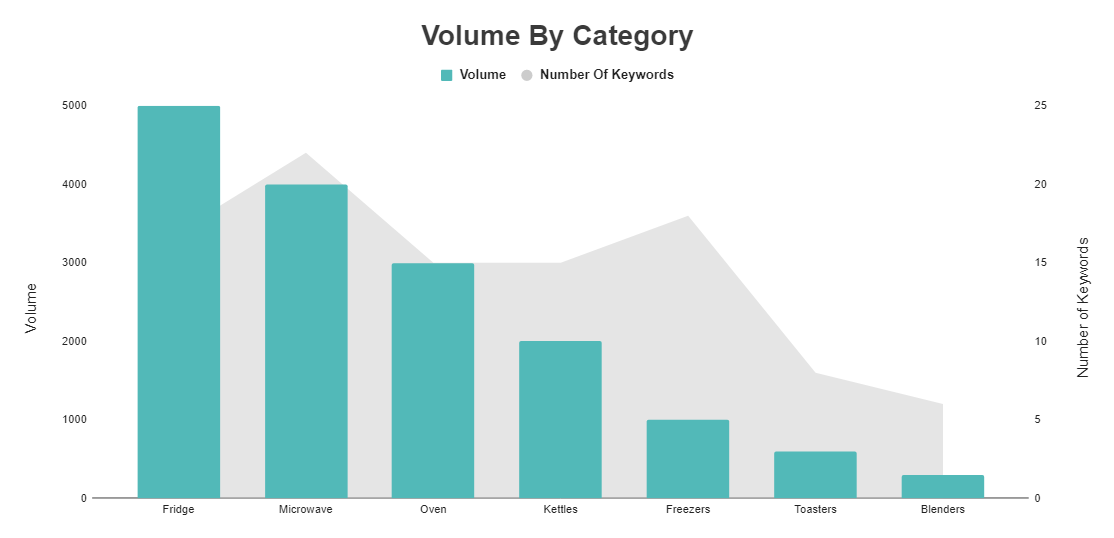
By being a little more advanced, we could try clustering (or grouping) related keywords and then look at the collated volume of each cluster. After you have that information, you can then focus on the category of keywords which attracts the most search volume.

Some different ways of grouping your keywords could be:

  • By word operators, e.g. how, what, where, when, why

  • By topic, e.g. fridges, microwaves, recipes

  • By the intent of the keyword, e.g. transactional (looking to buy) informational (looking for information), navigational (branded keywords, looking to browse a specific site)

  • By the length of the keyword, e.g. head (one word, high volume), body (2-3 words medium to high volume) or long tail (4+ words, low to medium volume).

  • By how commercial the keyword is. I typically do this based on CPC (cost per click) data and put it into low, medium and high categories. A high CPC means that more people are bidding on the keyword, which usually implies that it converts better and is more commercial.

Introducing Traffic Estimations

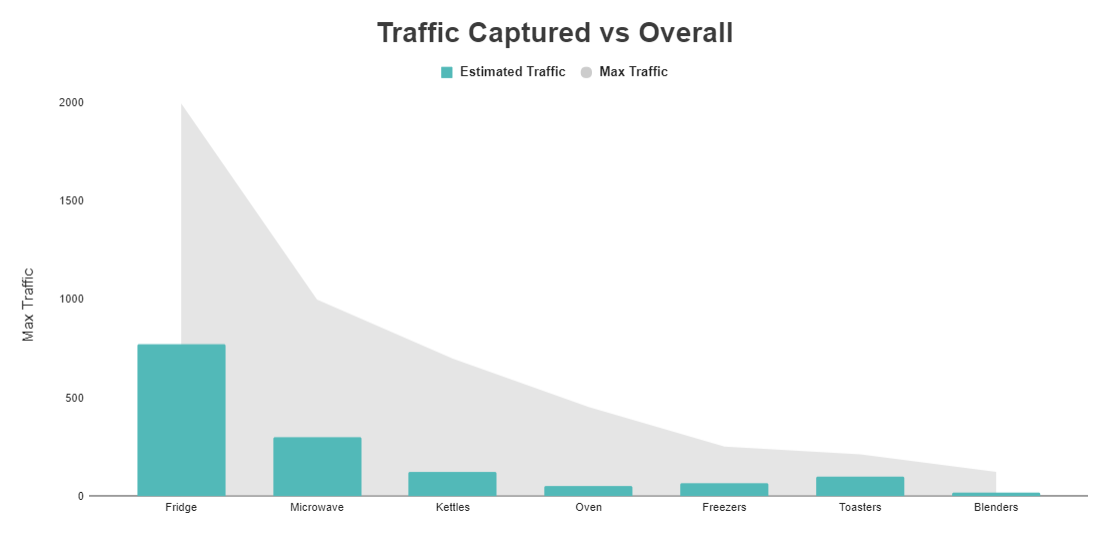
If you want to take this a step further, you could look at the incremental traffic to be gained from each keyword. This is based upon your current position, how many times it is searched per month, the estimated click-through rate (CTR) and the maximum traffic you can get from ranking in position one.

To break that down:

You can then assess the incremental traffic in relation to the ways in which you have clustered your keywords, and highlight any gaps in which you can gain traffic.

The graphs for these would like the same as the ones above, except with incremental traffic, max traffic or estimated traffic plotted instead of volume. At this stage, you could even do an analysis of how much market share you have captured for each topic:

Is this really highlighting opportunity?

These methods of highlighting opportunity work, and the latter methods in particular are much better than just looking at search volume in isolation.

However, none of these methods tells you how difficult it is going to be to attain the traffic figures you are highlighting.

Opportunity is defined by the Cambridge English Dictionary as:

‘An occasion or situation that makes it possible to do something that you want to do or have to do, or the possibility of doing something.’

With both methods, we are only really showing where the volume is, we are not saying how possible it is for us to achieve those incremental traffic figures. So, are we truly highlighting opportunity?

This is where we can introduce a keyword difficulty metric so that you can look at address both the opportunity and the difficulty in terms of your traffic figures.

Once you have created such a metric, your opportunity analysis begins to look a bit more like this:

Now, we are no longer just highlighting where the traffic is, we are also showing how difficult it is to get, which means we are now really showing the opportunity.

From the above chart, we can now see that, while fridges have lots of opportunity for additional traffic, it makes far more sense to concentrate on microwaves and kettles as they both still have a large number of searches but the difficulty to rank well for these terms is far lower.

Creating a keyword difficulty metric

Before we begin, here are some features of the keyword difficulty metric:

  • It works on a logarithmic scale from 0 – 100
  • 75% of the metric is based upon referring domains to the URL, the remaining 25% is based upon domain level referring domains
  • When we show the metric by category, a weighted average is taken. The weight is the search volume of each keyword within the category. This means high volume keywords contribute to the difficulty of the category more than the low volume ones.

Rather than going into more detail on how the metric is created, first I’ll run through what you need to do so you can go ahead and start creating it yourself. Use our template from the next section and if you want to learn more about its creation , skip ahead to the end of the article.

To start building this metric, you will first need to do some data collection. You will need to find:

  • The top 10 results for each keyword you have from your research
  • The number of referring domains to each URL in the top 10
  • The number of referring domains to each domain in the top 10

Before we collect these, do some keyword research and enter your results into the keyword difficulty metric template we have created for you. Make sure to click ‘File’, and ‘Make a copy…’ to save your own version of the template.

To start with, just fill out the ‘Keyword Research’ sheet with your list of keywords, categories and search volumes.

Scrape the top 10 results

To get the top 10 results, I have access to our in-house rank tracker at Zazzle Media. You can, however, get this information from various tools such as:

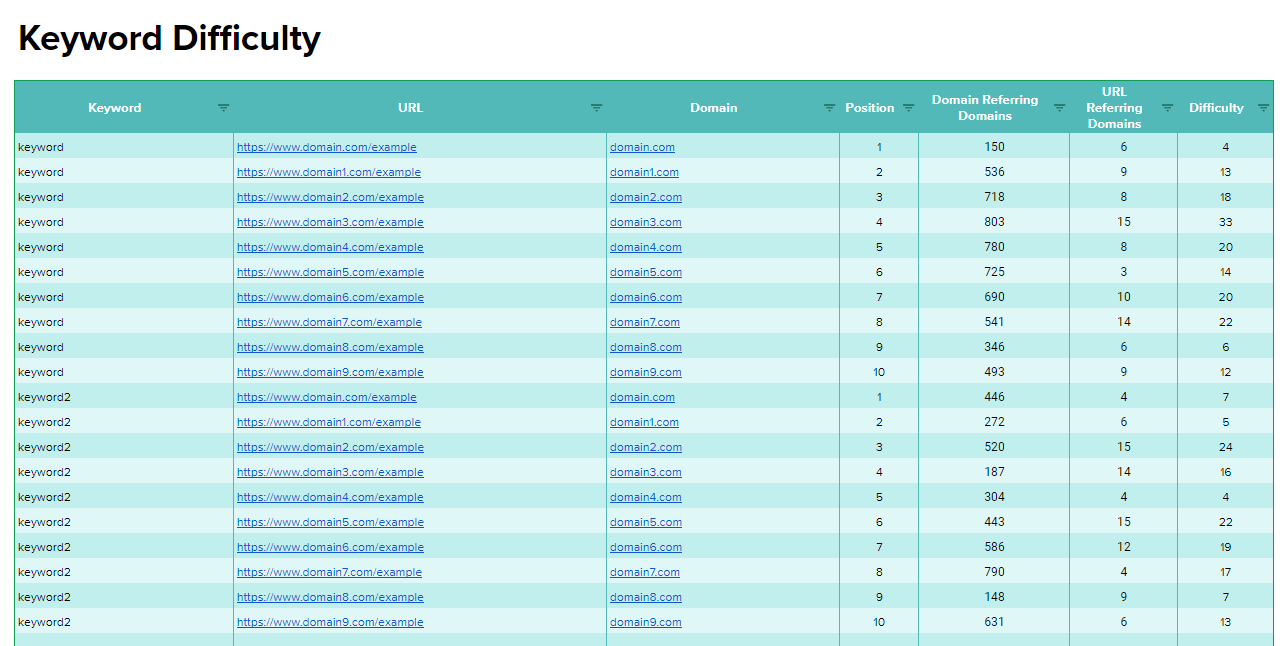
Add the URLs for your top 10 results, along with the associated keyword, into the ‘Keyword Difficulty’ tab of the template. The sheet should now look like this:

Once you have added all this information to your sheet, you need to collect the number of referring domains to both the URL and the domain. To do this, I usually use Majestic and URL Profiler to quickly pull data via the API. Both Majestic and URL Profiler are paid tools, but they are worth spending the money on given the data they provide.

Copy the URLs from your keyword difficulty sheet and paste them into URL Profiler. Select the URL Level Data and Domain Level Data tick boxes for Majestic; you may need to link up to the Majestic API when you do this. After, select ‘Run Profiler’ in the bottom right.

Once you have the export, copy and paste the URL, domain referring domains and URL referring domains over to the ‘Keyword Difficulty URLs’ tab. The ‘Keyword Difficulty’ sheet will now create the difficulty metric for each URL ranking in positions 1 – 10 and will look like the below.

Of course, we want results for each keyword, rather than for each URL ranking in the search result. If you go back to the ‘Keyword Research’ sheet that you originally put all your keywords and data into, you will see that the keyword difficulty metric has been averaged across all sites ranking within the top 10 for that keyword.

Opportunity Charts

Now, when you go into the ‘Category Opportunity’ tab, you will be able to see the ‘volume against keyword difficulty’ charts shown earlier as well as ‘traffic captured vs overall’ and ‘incremental traffic by category’.

Along with these, I have also added a difficulty distribution bubble charts in the ‘Category Difficulty Distribution’ and ‘Keyword Difficulty Distribution’ tabs.

Here is what a category difficulty distribution chart looks like:

Here is a keyword difficulty distribution chart:

When you have inputted your data, you will see actual keywords and categories rather than the dummy data I’ve currently inputted. To give you a bit more of an idea what you can gain from these charts, here are some descriptions of how you should target keywords or categories depending on their location on the chart:

Upper Left: High Difficulty, low opportunity. These are usually not worth the investment in link building activity.

Bottom Left: Low difficulty, low opportunity. We should target some of these keywords, especially the ones in the right side of the bottom left quarter.

Upper Right: High difficulty, high opportunity. It will take a lot of work to rank for these, but we will see a large return in traffic from doing so.

Bottom Right: Low difficulty, high opportunity. We can rank for these keywords with a smaller link building campaign and we will see a high return in traffic.

These charts can be handy if you are struggling to see category opportunity from just analysing the bar and area chart in the ‘Category Opportunity’ tab.

More about the metric

Correlation studies all state near enough the same thing, namely that links to your site are still the most influential factor when it comes to ranking a page. Here is a recent example of this from Ahrefs (which also has its own Keyword Difficulty metric if you don’t mind paying for it):

Because the data says links still correlate the most, it makes sense to base the keyword difficulty metric on this.

The Ahrefs study above states that referring domains correlate with rankings less than referring domains to an individual URL.

Because of this, it also makes sense for our metric to put more weight on the number of referring domains to the URLs, rather than the number of referring domains to each domain on the search result.

Here’s how the difficulty scales for links to the URL (making up 75% of the score):

Here is the scale for domains referring domains (making up 25% of the score):

Conclusion

If you’ve read through this and managed to calculate keyword difficulty, you should now be able to increase the quality of your opportunity analysis tenfold and be able to highlight whether or not targeting a topic/niche for traffic is viable for you.

Moving forward, you should be able to target queries and users based upon whether ranking for a term is achievable, not solely on whether or not people are searching for it.

If you have any questions feel free to tweet me at @SamUnderwoodUK.


from https://searchenginewatch.com/2017/12/21/how-to-highlight-search-opportunity-and-create-a-keyword-difficulty-metric/

source https://kateninablog.tumblr.com/post/168811058334